Garden Romance Cinematic AI Video | Yellow Flowers & Car | Flow AI Editing
Is cinematic AI video prompt se Flow AI Video Generator mein uploaded reference photo ka use karke ek premium ultra-realistic cinematic garden video create kiya ja sakta hai.
Video mein same person ko lush green garden mein yellow flowers aur black car ke saath stylish cinematic poses mein dikhaya gaya hai. Reference photo ke according face, hairstyle, skin tone, height, body build aur natural body proportions ko poore video mein consistent maintain kiya gaya hai.
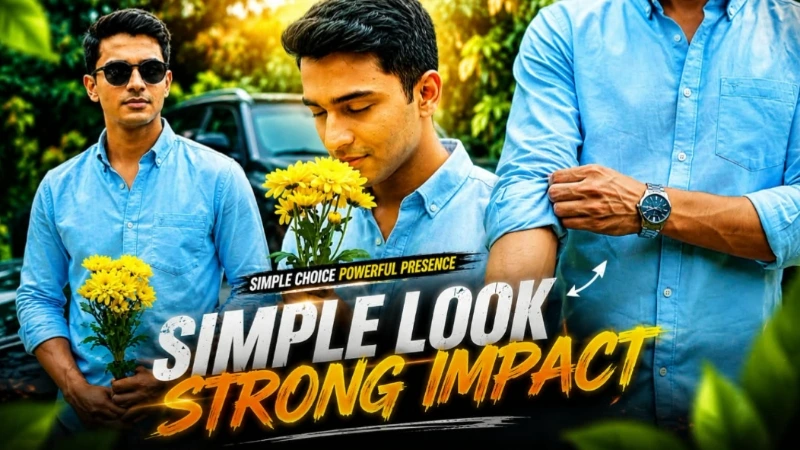
Light blue rolled-sleeve shirt, silver wristwatch, black round sunglasses aur yellow flowers ko har scene mein same rakha gaya hai. Green trees, bushes, grey boundary wall, parked black car aur natural daylight poore video mein consistent environment create karte hain.
7 cinematic scenes mein romantic flower close-up, intense eye close-up, car-side hero shot, watch detail, hair gesture, sunglasses pose aur final confident camera look include hain.
Natural daylight, vibrant green cinematic colour grading, realistic skin texture, detailed hair, natural hand movement, cinematic depth of field aur smooth camera movement video ko professional live-action footage jaisa look dete hain.
Ye prompt Flow AI Video, Cinematic AI Video, Garden Video, AI Video Generator, Photo To Video, Instagram Reels aur YouTube Shorts ke liye perfect hai.
AI Video Prompt
✦AI VIDEO PROMPT
Use the uploaded reference photo for the man's face, hairstyle, skin tone, body build and height. Keep identity exactly same as reference photo — no alteration to face, body, or hairstyle in any scene. Keep the person's body proportions natural and realistic, matching the exact build shown in the reference photo — do not add extra muscle, height, or bulk. His body scale should match whatever is shown in the uploaded photo, whether short, tall, slim or heavy. Outfit (same throughout, do not change): light blue button-up shirt with collar, sleeves rolled up to the forearm, a silver wristwatch, black-framed round sunglasses, holding a bunch of yellow flowers. Location (same throughout all 7 scenes, do not change): outdoor green garden setting with dense green trees and bushes in the background, a low grey boundary wall, a parked black car partially visible beside him, soft natural daylight, lush green tones throughout. Color grade: natural vibrant green cinematic tone, soft daylight contrast, sharp realistic detail, consistent across all scenes. Create 7 cinematic scenes, same outfit and same garden-with-car location throughout: Scene 1 (same garden location): Close-up shot, man holding yellow flowers near his chin, looking down at them, soft romantic expression, greenery blurred behind him. Scene 2 (same garden location): Extreme close-up shot of the man's eyes, looking to the side with a calm intense expression, soft natural light on his face. Scene 3 (same garden location): Medium shot, man standing near the parked black car, looking to the side with a confident expression, sunglasses on, green trees and boundary wall in background. Scene 4 (same garden location): Close-up shot of the man's hand and arm, rolling up his shirt sleeve, silver wristwatch clearly visible, black car and greenery blurred in background. Scene 5 (same garden location): Close-up shot, man running both hands through his hair, head tilted down, sunglasses slightly lowered, greenery blurred in background. Scene 6 (same garden location): Close-up shot, man turning his head toward the camera, holding his sunglasses in one hand near his face, calm confident expression. Scene 7 (same garden location): Medium close-up shot, man standing confidently near the car, sunglasses on, holding flowers, looking directly at the camera with a calm, stylish expression, garden background blurred behind him. Format: 16:9 landscape, 1080p resolution, smooth cinematic pacing with natural camera movement throughout, same location maintained from Scene 1 to Scene 7. Watermark: small semi-transparent text "aiediting007" in the bottom-right corner, visible consistently across all 7 scenes.
Use the uploaded reference photo for the man's face, hairstyle, skin tone, body build and height. Keep identity exactly same as reference photo — no alteration to face, body, or hairstyle in any scene.
Keep the person's body proportions natural and realistic, matching the exact build shown in the reference photo — do not add extra muscle, height, or bulk. His body scale should match whatever is shown in the uploaded photo, whether short, tall, slim or heavy.
Outfit (same throughout, do not change): light blue button-up shirt with collar, sleeves rolled up to the forearm, a silver wristwatch, black-framed round sunglasses, holding a bunch of yellow flowers.
Location (same throughout all 7 scenes, do not change): outdoor green garden setting with dense green trees and bushes in the background, a low grey boundary wall, a parked black car partially visible beside him, soft natural daylight, lush green tones throughout.
Color grade: natural vibrant green cinematic tone, soft daylight contrast, sharp realistic detail, consistent across all scenes.
Create 7 cinematic scenes, same outfit and same garden-with-car location throughout:
Scene 1 (same garden location): Close-up shot, man holding yellow flowers near his chin, looking down at them, soft romantic expression, greenery blurred behind him.
Scene 2 (same garden location): Extreme close-up shot of the man's eyes, looking to the side with a calm intense expression, soft natural light on his face.
Scene 3 (same garden location): Medium shot, man standing near the parked black car, looking to the side with a confident expression, sunglasses on, green trees and boundary wall in background.
Scene 4 (same garden location): Close-up shot of the man's hand and arm, rolling up his shirt sleeve, silver wristwatch clearly visible, black car and greenery blurred in background.
Scene 5 (same garden location): Close-up shot, man running both hands through his hair, head tilted down, sunglasses slightly lowered, greenery blurred in background.
Scene 6 (same garden location): Close-up shot, man turning his head toward the camera, holding his sunglasses in one hand near his face, calm confident expression.
Scene 7 (same garden location): Medium close-up shot, man standing confidently near the car, sunglasses on, holding flowers, looking directly at the camera with a calm, stylish expression, garden background blurred behind him.
Format: 16:9 landscape, 1080p resolution, smooth cinematic pacing with natural camera movement throughout, same location maintained from Scene 1 to Scene 7.
Watermark: small semi-transparent text "aiediting007" in the bottom-right corner, visible consistently across all 7 scenes.
✓
Prompt copied to clipboard!
AI Video Prompt
✦AI VIDEO PROMPT
Use the uploaded reference photo for the man's face, hairstyle, skin tone, body build and height. Keep identity exactly same as reference photo — no alteration to face, body, or hairstyle in any scene. Keep the person's body proportions natural and realistic, matching the exact build shown in the reference photo — do not add extra muscle, height, or bulk. His body scale should match whatever is shown in the uploaded photo, whether short, tall, slim or heavy. Outfit (same throughout, do not change): light blue button-up shirt with collar, sleeves rolled up to the forearm, a silver wristwatch, black-framed round sunglasses, holding a bunch of yellow flowers. Location (same throughout all 7 scenes, do not change): outdoor green garden setting with dense green trees and bushes in the background, a low grey boundary wall, a parked black car partially visible beside him, soft natural daylight, lush green tones throughout. Color grade: natural vibrant green cinematic tone, soft daylight contrast, sharp realistic detail, consistent across all scenes. Create 7 cinematic scenes, same outfit and same garden-with-car location throughout: Scene 1 (same garden location): Close-up shot, man holding yellow flowers near his chin, looking down at them, soft romantic expression, greenery blurred behind him. Scene 2 (same garden location): Extreme close-up shot of the man's eyes, looking to the side with a calm intense expression, soft natural light on his face. Scene 3 (same garden location): Medium shot, man standing near the parked black car, looking to the side with a confident expression, sunglasses on, green trees and boundary wall in background. Scene 4 (same garden location): Close-up shot of the man's hand and arm, rolling up his shirt sleeve, silver wristwatch clearly visible, black car and greenery blurred in background. Scene 5 (same garden location): Close-up shot, man running both hands through his hair, head tilted down, sunglasses slightly lowered, greenery blurred in background. Scene 6 (same garden location): Close-up shot, man turning his head toward the camera, holding his sunglasses in one hand near his face, calm confident expression. Scene 7 (same garden location): Medium close-up shot, man standing confidently near the car, sunglasses on, holding flowers, looking directly at the camera with a calm, stylish expression, garden background blurred behind him. Format: 16:9 landscape, 1080p resolution, smooth cinematic pacing with natural camera movement throughout, same location maintained from Scene 1 to Scene 7. Watermark: small semi-transparent text "aiediting007" in the bottom-right corner, visible consistently across all 7 scenes.
Use the uploaded reference photo for the man's face, hairstyle, skin tone, body build and height. Keep identity exactly same as reference photo — no alteration to face, body, or hairstyle in any scene.
Keep the person's body proportions natural and realistic, matching the exact build shown in the reference photo — do not add extra muscle, height, or bulk. His body scale should match whatever is shown in the uploaded photo, whether short, tall, slim or heavy.
Outfit (same throughout, do not change): light blue button-up shirt with collar, sleeves rolled up to the forearm, a silver wristwatch, black-framed round sunglasses, holding a bunch of yellow flowers.
Location (same throughout all 7 scenes, do not change): outdoor green garden setting with dense green trees and bushes in the background, a low grey boundary wall, a parked black car partially visible beside him, soft natural daylight, lush green tones throughout.
Color grade: natural vibrant green cinematic tone, soft daylight contrast, sharp realistic detail, consistent across all scenes.
Create 7 cinematic scenes, same outfit and same garden-with-car location throughout:
Scene 1 (same garden location): Close-up shot, man holding yellow flowers near his chin, looking down at them, soft romantic expression, greenery blurred behind him.
Scene 2 (same garden location): Extreme close-up shot of the man's eyes, looking to the side with a calm intense expression, soft natural light on his face.
Scene 3 (same garden location): Medium shot, man standing near the parked black car, looking to the side with a confident expression, sunglasses on, green trees and boundary wall in background.
Scene 4 (same garden location): Close-up shot of the man's hand and arm, rolling up his shirt sleeve, silver wristwatch clearly visible, black car and greenery blurred in background.
Scene 5 (same garden location): Close-up shot, man running both hands through his hair, head tilted down, sunglasses slightly lowered, greenery blurred in background.
Scene 6 (same garden location): Close-up shot, man turning his head toward the camera, holding his sunglasses in one hand near his face, calm confident expression.
Scene 7 (same garden location): Medium close-up shot, man standing confidently near the car, sunglasses on, holding flowers, looking directly at the camera with a calm, stylish expression, garden background blurred behind him.
Format: 16:9 landscape, 1080p resolution, smooth cinematic pacing with natural camera movement throughout, same location maintained from Scene 1 to Scene 7.
Watermark: small semi-transparent text "aiediting007" in the bottom-right corner, visible consistently across all 7 scenes.
Garden Cinematic AI VideoGarden AI VideoFlow AI VideoFlow AI Video GeneratorFlow AI Video PromptFlow AI PromptFlow AI EditingFlow AI Editing TutorialCinematic AI VideoCinematic AI Video PromptAI Video Generator
Garden Cinematic AI VideoGarden AI VideoFlow AI VideoFlow AI Video GeneratorFlow AI Video PromptFlow AI PromptFlow AI EditingFlow AI Editing TutorialCinematic AI VideoCinematic AI Video PromptAI Video Generator
Gym to Dream Girl AI Video & Awarapan 2 Poster AI Photo Tutorial
AI editing can turn simple reference photos into cinematic storytelling videos and realistic movie-poster-style portraits. In this tutorial, we combine two creative techniques: creating a Gym to Dream Girl cinematic video with Flow AI and generating an Awarapan 2 cinema-hall photo with ChatGPT. Both projects focus on strict identity preservation, realistic details, cinematic lighting, and professional visual quality.
1. Create a Gym to Dream Girl Cinematic AI Video
Start by preparing two clear, high-quality reference photos. Photo 1 is used for the man's face, hairstyle, skin tone, height, body build, and natural proportions, while Photo 2 is used for the woman's identity. Both identities should remain exactly consistent throughout the video without changing their faces, hairstyles, height, or body proportions.
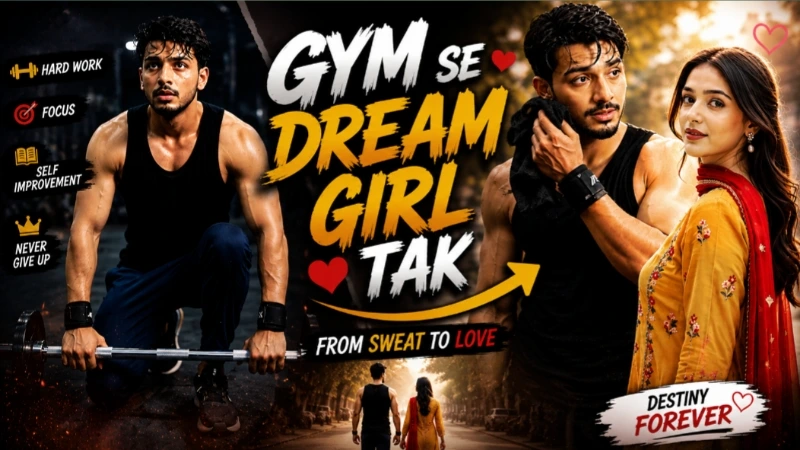
Open Flow AI Video Generator and upload both reference photos. Paste the complete Gym to Dream Girl AI Video Prompt and select 9:16 vertical format with 1080p resolution. The man wears a plain black tank top, navy-blue jogger pants, black wrist wraps, damp workout hair, and a realistic sweaty appearance. The woman wears a mustard-yellow traditional suit with floral embroidery, a red dupatta, pearl drop earrings, dark red lipstick, and a side-braid hairstyle.
The seven-scene story alternates between the man's gritty gym reality and his dreamy imagination. The first scenes show him working with a barbell in a dark industrial gym, followed by the woman gracefully walking along a tree-lined street. Later, the man pauses and looks distracted while imagining her, and the final dream scene shows the woman walking away as the image gradually becomes softer and more blurred.
The visual contrast is important: gym scenes use dark, moody, gritty lighting with warm skin highlights, while dream scenes use bright daylight, pastel tones, gentle glow, and slightly hazy focus. After generation, check identity, hands, body movement, clothing, background, and transitions for distortion or flickering.
2. Create an Awarapan 2 Cinema Poster AI Photo
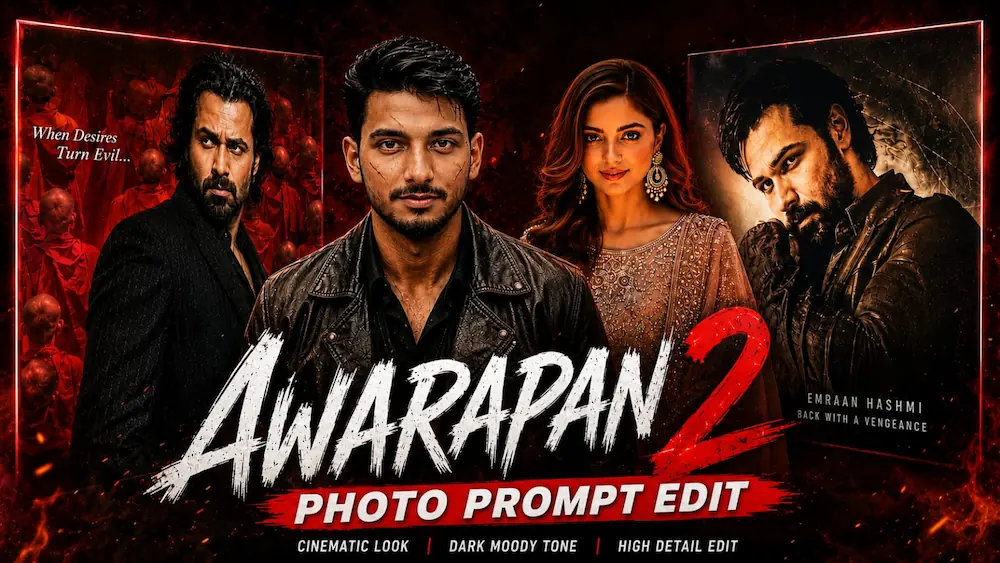
For the second project, use ChatGPT with a clear reference photo. The main concept places the uploaded person naturally beside the original Awarapan 2 movie poster inside a premium cinema environment. The person's face, hairstyle, beard, expression, skin tone, and body proportions should remain unchanged.
Upload your photo to ChatGPT and paste the Awarapan 2 Cinema Hall Master Prompt. The original poster featuring Emraan Hashmi should remain completely unchanged, including its title, typography, colours, actors, background, credits, and overall poster design. The person stands beside the illuminated poster frame, wearing the same clothing as the reference or a realistic black outfit, with a natural confident pose.
The cinema environment includes textured walls, warm theater lighting, glass reflections, realistic shadows, polished surfaces, and shallow depth of field. The recommended composition is 4:5 vertical, with an ultra-realistic DSLR, HDR, 8K-style cinematic photography appearance.
The page also provides an alternative poster-style version where the subject stands in the center of a massive crowd of red-robed monks, recreating the dramatic composition and camera angle of the original poster while maintaining the person's identity.
Final Result
With accurate reference photos and detailed prompts, Flow AI can create a dramatic Gym-to-Dream-Girl cinematic story, while ChatGPT can place you naturally inside an Awarapan 2-inspired cinema poster environment. The most important factors are identity consistency, realistic anatomy, controlled lighting, scene continuity, and careful final checking before using the finished content.