Lake City Cinematic AI Video | Flow AI Video Generator
Is cinematic AI video prompt se Flow AI Video Generator mein uploaded reference photo ka use karke ek ultra-realistic cinematic video create kiya ja sakta hai.
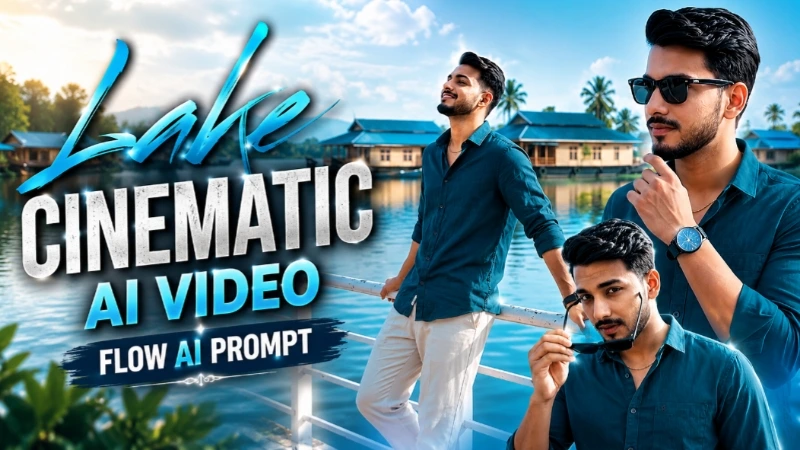
Video mein same person ko calm lake ke paas white railing ke saath cinematic poses aur natural movements mein dikhaya gaya hai. Background mein traditional blue-roofed houseboats, clear blue sky, soft clouds aur beautiful lakeside atmosphere poore video mein consistent rakha gaya hai.
Person ka exact face, hairstyle, skin tone, body build, height aur natural body proportions reference photo ke according maintain kiye gaye hain. Dark teal button-up shirt, light beige pants, white sneakers, black watch, thin gold chain aur black sunglasses ko poore video mein same rakha gaya hai.
Video mein railing pose, sky ki taraf dekhna, lakeside walking, sunglasses pose, sunglasses pehna, lake ki taraf dekhna aur final cinematic hero pose jaise 8 connected scenes hain.
Natural bright daylight, realistic skin texture, cinematic depth of field, smooth camera movement, natural body motion, clean colour grading aur premium 4K/8K-quality cinematic look video ko realistic banate hain.
Ye prompt Flow AI, AI Video Generator, Photo To Video, Cinematic AI Video, Instagram Reels, YouTube Shorts aur AI Video Editing ke liye perfect hai.
AI Video Prompt
✦AI VIDEO PROMPT
Use the uploaded reference photo for the man's face, hairstyle, skin tone, body build and height. Keep identity exactly same as reference photo — no alteration to face, body, or hairstyle in any scene. Keep the person's body proportions natural and realistic, matching the exact build shown in the reference photo — do not add extra muscle, height, or bulk. Maintain a normal, natural body scale identical to the uploaded photo. Outfit (same throughout, do not change): dark teal button-up shirt with sleeves rolled up to the forearm, a few top buttons open, light beige/cream pants, white sneakers, black watch, thin gold chain necklace, black sunglasses. IMPORTANT — LOCATION LOCK: All 8 scenes take place at the SAME single location — a calm lake with traditional blue-roofed houseboats in the background, a white metal railing along the walkway, clear blue sky with soft clouds, bright natural daylight. This exact location must repeat identically in every scene — do not change the background or lighting at any point. Color grade: natural bright daylight tone, crisp and clean cinematic look, consistent across all scenes. Create 8 cinematic scenes, same outfit and same lake-city location throughout: Scene 1 (same lake location): Medium shot, man leaning on the white railing, turning his head toward the camera with a slight smile, lake and blue houseboats behind him. Scene 2 (same lake location): Wide shot, man leaning back on the railing looking up at the sky, relaxed confident pose, lake and houseboats in background. Scene 3 (same lake location): Full body shot, man walking toward the camera along the lakeside walkway, confident walk, street lamps and trees lining the path. Scene 4 (same lake location): Close-up shot, man holding his sunglasses in one hand near his chin, looking at the camera with a sharp confident expression, lake visible behind him. Scene 5 (same lake location): Medium shot, man putting on his sunglasses with one hand, calm confident expression, blue houseboats and lake in background. Scene 6 (same lake location): Medium shot, man standing at the railing looking sideways over the water, thoughtful expression, natural daylight. Scene 7 (same lake location): Medium shot, man standing near the railing wearing sunglasses, one hand raised near his chin, calm confident gaze to the side, lake and boats blurred behind him. Scene 8 (same lake location): Wide shot, man standing confidently facing the camera near the railing, hands relaxed, full lake and houseboat view behind him, natural finishing pose. Format: 9:16 vertical, 1080p resolution, smooth cinematic pacing with natural camera movement throughout, same location maintained from Scene 1 to Scene 8. Watermark: small semi-transparent text "NoorEdiz07" in the bottom-right corner, visible consistently across all 8 scenes.
Use the uploaded reference photo for the man's face, hairstyle, skin tone, body build and height. Keep identity exactly same as reference photo — no alteration to face, body, or hairstyle in any scene.
NATURAL BUILD:
Keep the person's body proportions natural and realistic, matching the exact build shown in the reference photo — do not add extra muscle, height, or bulk. Maintain a normal, natural body scale identical to the uploaded photo.
OUTFIT (same throughout, do not change):
Dark teal button-up shirt with sleeves rolled up to the forearm, a few top buttons open, light beige/cream pants, white sneakers, black watch, thin gold chain necklace, black sunglasses.
LOCATION LOCK (all 8 scenes):
All 8 scenes take place at the SAME single location — a calm lake with traditional blue-roofed houseboats in the background, a white metal railing along the walkway, clear blue sky with soft clouds, bright natural daylight. This exact location must repeat identically in every scene — do not change the background or lighting at any point.
COLOR GRADE:
Natural bright daylight tone, crisp and clean cinematic look, consistent across all scenes.
8 CINEMATIC SCENES (same outfit and same lake-city location throughout):
Scene 1: Medium shot, man leaning on the white railing, turning his head toward the camera with a slight smile, lake and blue houseboats behind him.
Scene 2: Wide shot, man leaning back on the railing looking up at the sky, relaxed confident pose, lake and houseboats in background.
Scene 3: Full body shot, man walking toward the camera along the lakeside walkway, confident walk, street lamps and trees lining the path.
Scene 4: Close-up shot, man holding his sunglasses in one hand near his chin, looking at the camera with a sharp confident expression, lake visible behind him.
Scene 5: Medium shot, man putting on his sunglasses with one hand, calm confident expression, blue houseboats and lake in background.
Scene 6: Medium shot, man standing at the railing looking sideways over the water, thoughtful expression, natural daylight.
Scene 7: Medium shot, man standing near the railing wearing sunglasses, one hand raised near his chin, calm confident gaze to the side, lake and boats blurred behind him.
Scene 8: Wide shot, man standing confidently facing the camera near the railing, hands relaxed, full lake and houseboat view behind him, natural finishing pose.
FORMAT:
9:16 vertical, 1080p resolution, smooth cinematic pacing with natural camera movement throughout, same location maintained from Scene 1 to Scene 8.
WATERMARK:
Small semi-transparent text "NoorEditing07" in the bottom-right corner, visible consistently across all 8 scenes.
✓
Prompt copied to clipboard!
AI Video Prompt
✦AI VIDEO PROMPT
Use the uploaded reference photo for the man's face, hairstyle, skin tone, body build and height. Keep identity exactly same as reference photo — no alteration to face, body, or hairstyle in any scene. Keep the person's body proportions natural and realistic, matching the exact build shown in the reference photo — do not add extra muscle, height, or bulk. Maintain a normal, natural body scale identical to the uploaded photo. Outfit (same throughout, do not change): dark teal button-up shirt with sleeves rolled up to the forearm, a few top buttons open, light beige/cream pants, white sneakers, black watch, thin gold chain necklace, black sunglasses. IMPORTANT — LOCATION LOCK: All 8 scenes take place at the SAME single location — a calm lake with traditional blue-roofed houseboats in the background, a white metal railing along the walkway, clear blue sky with soft clouds, bright natural daylight. This exact location must repeat identically in every scene — do not change the background or lighting at any point. Color grade: natural bright daylight tone, crisp and clean cinematic look, consistent across all scenes. Create 8 cinematic scenes, same outfit and same lake-city location throughout: Scene 1 (same lake location): Medium shot, man leaning on the white railing, turning his head toward the camera with a slight smile, lake and blue houseboats behind him. Scene 2 (same lake location): Wide shot, man leaning back on the railing looking up at the sky, relaxed confident pose, lake and houseboats in background. Scene 3 (same lake location): Full body shot, man walking toward the camera along the lakeside walkway, confident walk, street lamps and trees lining the path. Scene 4 (same lake location): Close-up shot, man holding his sunglasses in one hand near his chin, looking at the camera with a sharp confident expression, lake visible behind him. Scene 5 (same lake location): Medium shot, man putting on his sunglasses with one hand, calm confident expression, blue houseboats and lake in background. Scene 6 (same lake location): Medium shot, man standing at the railing looking sideways over the water, thoughtful expression, natural daylight. Scene 7 (same lake location): Medium shot, man standing near the railing wearing sunglasses, one hand raised near his chin, calm confident gaze to the side, lake and boats blurred behind him. Scene 8 (same lake location): Wide shot, man standing confidently facing the camera near the railing, hands relaxed, full lake and houseboat view behind him, natural finishing pose. Format: 9:16 vertical, 1080p resolution, smooth cinematic pacing with natural camera movement throughout, same location maintained from Scene 1 to Scene 8. Watermark: small semi-transparent text "NoorEdiz07" in the bottom-right corner, visible consistently across all 8 scenes.
Use the uploaded reference photo for the man's face, hairstyle, skin tone, body build and height. Keep identity exactly same as reference photo — no alteration to face, body, or hairstyle in any scene.
NATURAL BUILD:
Keep the person's body proportions natural and realistic, matching the exact build shown in the reference photo — do not add extra muscle, height, or bulk. Maintain a normal, natural body scale identical to the uploaded photo.
OUTFIT (same throughout, do not change):
Dark teal button-up shirt with sleeves rolled up to the forearm, a few top buttons open, light beige/cream pants, white sneakers, black watch, thin gold chain necklace, black sunglasses.
LOCATION LOCK (all 8 scenes):
All 8 scenes take place at the SAME single location — a calm lake with traditional blue-roofed houseboats in the background, a white metal railing along the walkway, clear blue sky with soft clouds, bright natural daylight. This exact location must repeat identically in every scene — do not change the background or lighting at any point.
COLOR GRADE:
Natural bright daylight tone, crisp and clean cinematic look, consistent across all scenes.
8 CINEMATIC SCENES (same outfit and same lake-city location throughout):
Scene 1: Medium shot, man leaning on the white railing, turning his head toward the camera with a slight smile, lake and blue houseboats behind him.
Scene 2: Wide shot, man leaning back on the railing looking up at the sky, relaxed confident pose, lake and houseboats in background.
Scene 3: Full body shot, man walking toward the camera along the lakeside walkway, confident walk, street lamps and trees lining the path.
Scene 4: Close-up shot, man holding his sunglasses in one hand near his chin, looking at the camera with a sharp confident expression, lake visible behind him.
Scene 5: Medium shot, man putting on his sunglasses with one hand, calm confident expression, blue houseboats and lake in background.
Scene 6: Medium shot, man standing at the railing looking sideways over the water, thoughtful expression, natural daylight.
Scene 7: Medium shot, man standing near the railing wearing sunglasses, one hand raised near his chin, calm confident gaze to the side, lake and boats blurred behind him.
Scene 8: Wide shot, man standing confidently facing the camera near the railing, hands relaxed, full lake and houseboat view behind him, natural finishing pose.
FORMAT:
9:16 vertical, 1080p resolution, smooth cinematic pacing with natural camera movement throughout, same location maintained from Scene 1 to Scene 8.
WATERMARK:
Small semi-transparent text "NoorEditing07" in the bottom-right corner, visible consistently across all 8 scenes.
Flow AI VideoFlow AI Video GeneratorFlow AI Video PromptFlow AI PromptCinematic AI VideoCinematic AI Video PromptAI Video GeneratorAI Video PromptAI Generated VideoAI Video EditingPhoto To Video AIImage To Video AI
Flow AI VideoFlow AI Video GeneratorFlow AI Video PromptFlow AI PromptCinematic AI VideoCinematic AI Video PromptAI Video GeneratorAI Video PromptAI Generated VideoAI Video EditingPhoto To Video AIImage To Video AI
Open Location Cinematic AI Video & Shadow Pencil Cartoon AI Photo Tutorial
AI editing can transform a simple reference photo into professional cinematic travel content or a creative photo with an artistic cartoon-shadow effect. In this tutorial, we combine two unique techniques: creating a 7-scene Open Location Cinematic Travel Video with Flow AI and generating a Shadow Pencil Cartoon Photo with ChatGPT. Both concepts focus on realistic details, identity preservation, cinematic composition, and high-quality visual output.
1. Create an Open Location Cinematic AI Video
Start with a clear full-body reference photo of the person. Open Flow AI Video Generator and upload the image. The prompt uses strict identity locking so the same face, facial structure, hairstyle, skin tone, apparent age, height, and natural body proportions remain consistent throughout all seven scenes. The outfit also stays unchanged: a dark premium oversized shirt, black T-shirt, relaxed dark trousers, white sneakers, wristwatch, and simple chain necklace.
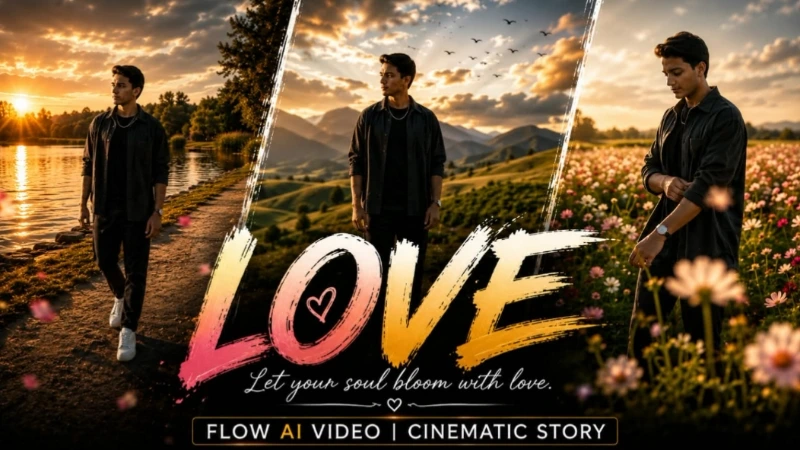
Select a 9:16 vertical format and the highest available quality. The video follows seven cinematic travel scenes across large open locations. It begins with the person walking through a green meadow during golden-hour daylight, followed by a wide lakeside drone-style reveal. The third scene moves through a vast flower field with smooth side tracking, while the fourth uses a cinematic semicircle camera movement on an open grassy hillside.
The fifth scene shows a stabilized front-tracking lakeside walk. The sixth reveals a large valley and distant mountains through a slow drone-style pullback during sunset. The final scene is a three-quarter hero shot in a huge sunset landscape with a slow cinematic push-in. Natural wind, realistic clothing and hair movement, smooth camera motion, atmospheric depth, and premium colour grading create the feeling of a professional travel film.
After generation, carefully check the face, body proportions, outfit, accessories, hands, feet, walking movement, drone shots, and background transitions. If you see identity drift, face blur, extra fingers, floating feet, body distortion, or background warping, regenerate the video.
2. Create a Shadow Pencil Cartoon AI Photo
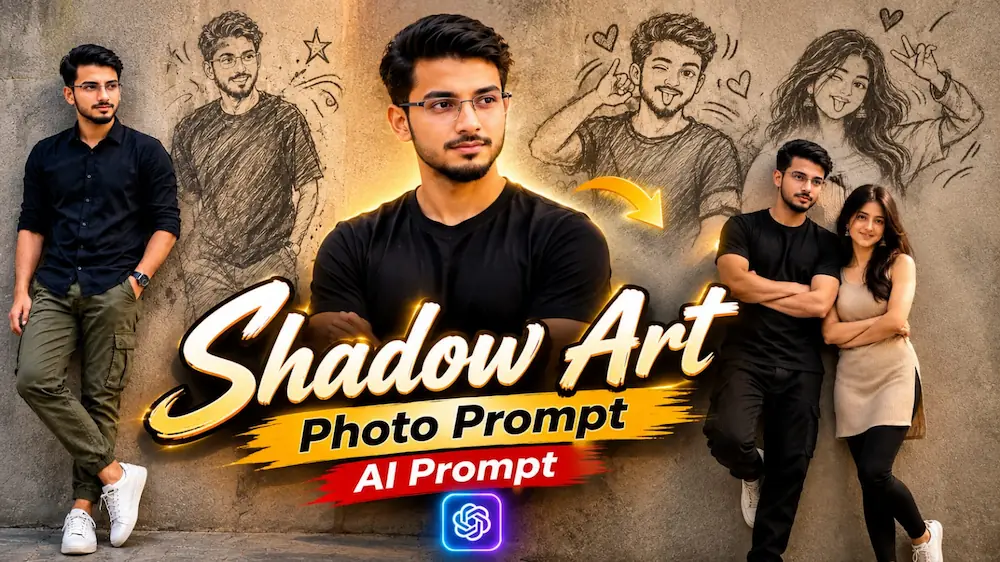
For the second concept, open ChatGPT and upload a clear original photo. The main subject remains completely realistic, while the person's shadow on a textured wall transforms into a playful hand-drawn cartoon version. The primary example uses a dark navy or black button-up shirt, olive-green cargo jogger pants, white sneakers, and a wristwatch.
The person stands casually against a textured concrete wall with one hand in the pocket and a confident expression. Bright natural daylight, realistic skin pores, fabric texture, soft shadows, an 85mm DSLR look, and shallow depth of field make the real person appear like a genuine professional photograph.
The creative effect comes from the transforming shadow. Instead of appearing as a normal shadow, it becomes a grey, flat-style cartoon character with a smiling expression, playful pose, snapping gesture, and hand-drawn motion lines. This creates a unique combination of realistic photography and graphic illustration. The image is designed in a 9:16 vertical format with 8K-level detail.
Upload the photo, paste the complete prompt into ChatGPT, and generate the image. Afterward, check that the original face, body, clothing, hands, and realistic textures remain natural while the cartoon shadow stays clearly connected to the subject.
Final Result
These two techniques turn ordinary photos into highly creative AI content. Flow AI creates a seven-scene cinematic journey through meadows, lakes, flower fields, hills, valleys, and sunset landscapes, while ChatGPT creates a unique realistic portrait with a cartoon shadow coming alive. Strong identity preservation, realistic movement, natural lighting, and careful final checking are the keys to achieving a premium result.