Use the uploaded clear person photo as the ONLY, PRIMARY and ABSOLUTE identity reference.
Create ONE continuous premium ultra-realistic horizontal 16:9 cinematic video, exactly 10 seconds long, containing ALL connected scenes below in the exact order.
IMPORTANT:
Show every scene clearly.
Do not skip any scene.
Do not rush the scenes.
Do not cut any scene too short.
Do not turn this into a fast highlight montage.
Every scene must be clearly visible from beginning to end.
The final result must look like genuine professionally filmed real live-action footage, not AI-looking footage.
==================================================
ABSOLUTE IDENTITY LOCK — HIGHEST PRIORITY
==================================================
Preserve the uploaded person’s exact real:
face shape,
forehead,
eyes,
eye spacing,
eyebrows,
nose,
lips,
jawline,
chin,
ears,
skin tone,
natural skin texture,
facial asymmetry,
hairstyle,
hairline,
natural age,
natural height,
shoulder width,
body shape,
arm length,
leg length,
head-to-body ratio and realistic body proportions.
The same exact uploaded person must remain visible in every scene.
Never create a similar-looking replacement person.
Never beautify the face.
Never redesign, reconstruct or morph the face.
Never change hairstyle.
Never change age.
Never change body shape.
Never change height.
Never change proportions.
Use one permanently locked face and one permanently locked body throughout the full video.
Whenever the face becomes visible after motion or a cut, restore the identity directly from the original uploaded photo.
No face change.
No identity drift.
No face swap.
No face morphing.
No body change.
==================================================
OUTFIT LOCK — KEEP SAME OUTFIT
==================================================
Keep the exact same outfit throughout the full video:
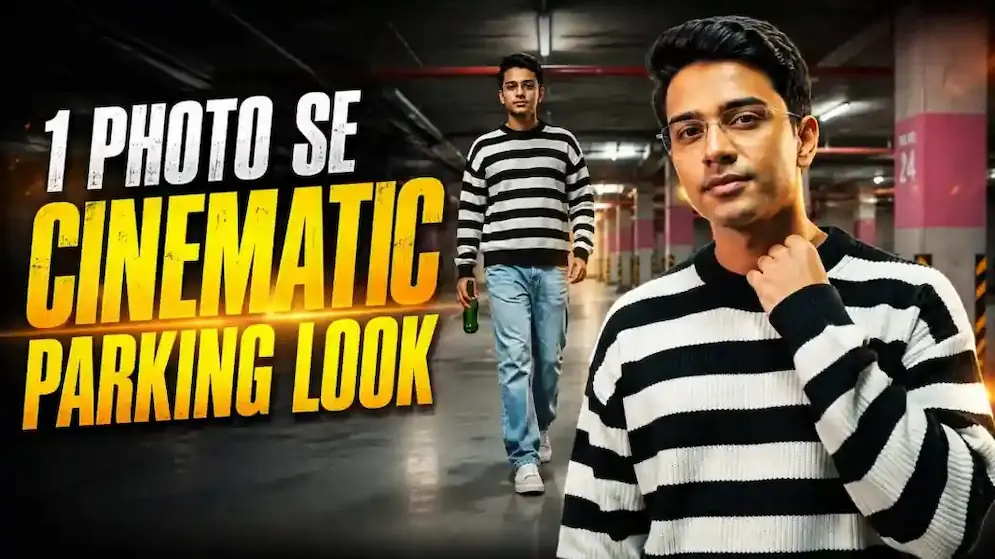
• oversized black-and-white horizontal striped sweater
• loose light blue denim jeans
• simple casual sneakers
• one green glass bottle held naturally in the right hand
Keep the exact same:
sweater pattern,
sweater fit,
jeans fit,
shoe style,
bottle size and bottle colour
in every scene.
Do not change outfit in any shot.
==================================================
LOCATION LOCK — KEEP SAME PLACE
==================================================
Keep the same exact location throughout:
• empty underground parking garage / basement parking
• dark ceiling with exposed beams and pipes
• soft warm overhead lighting
• concrete pillars
• pillars with pink / maroon lower section and yellow-orange safety markings
• smooth grey floor
• warm light glow in background
• no extra people
• no cars in foreground
• clean open parking space atmosphere
Every scene must clearly feel filmed in the same parking basement.
==================================================
COLOUR GRADING LOCK
==================================================
Keep the same premium cinematic grading throughout:
• warm amber-orange practical lighting
• soft moody shadows
• slightly dark cinematic exposure
• clean skin tones
• rich black sweater stripes
• creamy white sweater stripes
• subtle teal-grey background shadows
• premium soft contrast
• slightly dreamy music-video finish
• realistic indoor night mood
Do not use fake HDR.
Do not oversaturate.
Do not create orange skin.
Do not create a CGI look.
==================================================
VERY IMPORTANT FULL-SCENE RULE
==================================================
All scenes must be shown fully and clearly.
Each scene must have enough time to understand the action.
Do not flash through the actions.
Do not omit transitions between actions.
Approximate timing:
Scene 1 = 0.0 to 1.4 sec
Scene 2 = 1.4 to 2.8 sec
Scene 3 = 2.8 to 4.2 sec
Scene 4 = 4.2 to 5.8 sec
Scene 5 = 5.8 to 7.6 sec
Scene 6 = 7.6 to 10.0 sec
All scenes must appear in this exact order.
==================================================
FULL STORY — ALL SCENES MANDATORY
==================================================
SCENE 1 — 0.0 to 1.4 sec
LOW WALKING INTRO
Begin with a low-angle moving shot focused on the lower torso and legs while the subject walks slowly through the parking basement.
The bottle hangs naturally in the right hand.
The striped sweater and loose jeans are clearly visible.
The camera tracks smoothly beside or slightly in front of the subject.
This scene must clearly show:
1. walking motion,
2. bottle in hand,
3. same outfit,
4. same basement environment.
Use natural realistic walking.
--------------------------------------------------
SCENE 2 — 1.4 to 2.8 sec
CONTINUED WALK WITH MOTION FEEL
Continue the walking scene with a slightly different moving angle.
Show the same subject still walking slowly and naturally in the basement.
Keep the right hand holding the green bottle.
Add a premium cinematic motion feel, but do not blur the identity when the face becomes visible.
This scene must clearly show:
1. continued walk,
2. same outfit,
3. same bottle,
4. same colour grading,
5. same location continuity.
--------------------------------------------------
SCENE 3 — 2.8 to 4.2 sec
WIDE STANDING HERO SHOT
Cut to a wider full-body shot.
The subject is now standing alone in the open parking space.
The subject pauses naturally and stands in a relaxed stylish pose.
Keep the same striped sweater, same jeans, same bottle in hand, same body proportions and same environment.
This scene must clearly show:
1. full body view,
2. same basement pillars and lighting,
3. same person clearly visible.
--------------------------------------------------
SCENE 4 — 4.2 to 5.8 sec
EMOTIONAL NECK / FACE GESTURE
Show the subject standing in the same place and gently touching the side of the neck or jawline with one hand while looking slightly upward.
The expression should feel calm, stylish and emotional.
The bottle remains naturally held in the other hand or lowered naturally.
This scene must clearly show:
1. slight upward face angle,
2. neck-touch gesture,
3. exact face visible,
4. same outfit and same place.
Use a soft slow push-in.
--------------------------------------------------
SCENE 5 — 5.8 to 7.6 sec
SLOW FORWARD MOTION / DRIFT
Show the subject again in a gentle walking or drifting movement through the same parking basement.
The head is slightly raised.
The mood remains calm and cinematic.
The striped sweater moves naturally while walking.
This scene must clearly show:
1. slow stylish motion,
2. same bottle,
3. same body,
4. same face,
5. same colour grading.
Use a smooth cinematic tracking shot.
--------------------------------------------------
SCENE 6 — 7.6 to 10.0 sec
FINAL HERO ENDING
End with a premium medium or medium-close hero shot.
The subject stands or slows to a stop in the same basement, still holding the bottle, and gives a calm emotional look while lightly touching the neck / face area or holding a relaxed stylish pose.
The exact uploaded face must be clearly visible and sharp.
The final shot must hold long enough to feel complete.
This scene must clearly show:
1. exact face,
2. same hairstyle,
3. same sweater and jeans,
4. same bottle,
5. same warm cinematic basement mood.
End naturally.
==================================================
FACE PRESERVATION RULES
==================================================
Whenever the face is visible:
restore the identity directly from the uploaded original photo.
Use front, front-three-quarter or mild side angles.
Keep the face sharp.
Keep head movement slow.
Keep facial features unchanged.
Keep skin texture natural.
Keep hairstyle exactly the same.
Do not use:
fast head turns,
extreme profile,
heavy face blur,
hidden face,
dramatic facial distortion,
random face redesign.
==================================================
BODY CONSISTENCY RULES
==================================================
Maintain the exact same:
height,
shoulder width,
torso proportions,
arm length,
leg length,
body size,
walking posture.
Do not make the subject taller, shorter, thinner, heavier or more muscular.
==================================================
MOTION RULES
==================================================
Use realistic subtle movement only:
natural walking,
gentle hand movement,
natural bottle swing,
soft breathing,
small head movement,
slow neck-touch gesture,
calm standing pose.
No exaggerated acting.
No unnatural limb movement.
No floating feet.
No sliding body.
==================================================
CAMERA RULES
==================================================
Use premium cinematic camera language only:
Scene 1:
low-angle moving tracking shot.
Scene 2:
smooth cinematic moving angle.
Scene 3:
wide full-body static or gentle push-in hero shot.
Scene 4:
medium shot with slow push-in.
Scene 5:
smooth stylish tracking shot.
Scene 6:
medium or medium-close final hero shot with subtle push-in.
No shaky camera.
No random zoom.
No fast zoom.
No flash montage.
No drone.
No fisheye distortion.
==================================================
FINAL QUALITY
==================================================
Ultra-realistic 8K live-action quality,
authentic skin texture,
realistic hair strands,
correct anatomy,
natural clothing folds,
realistic bottle texture,
real parking-garage lighting,
premium depth of field,
clean cinematic professional finish.
==================================================
NEGATIVE PROMPT
==================================================
No face change,
no identity drift,
no hairstyle change,
no body change,
no age change,
no height change,
no face morphing,
no face swap,
no beautification,
no skin smoothing,
no outfit change,
no bottle change,
no missing scene,
no scene skipping,
no flash cuts,
no random montage,
no extra people,
no duplicate subject,
no broken hands,
no extra fingers,
no distorted body,
no floating feet,
no cartoon,
no anime,
no painting,
no cheap CGI,
no text,
no logo,
no watermark.