Double Role AI Video | Same Person Twin Effect | Flow AI Editing
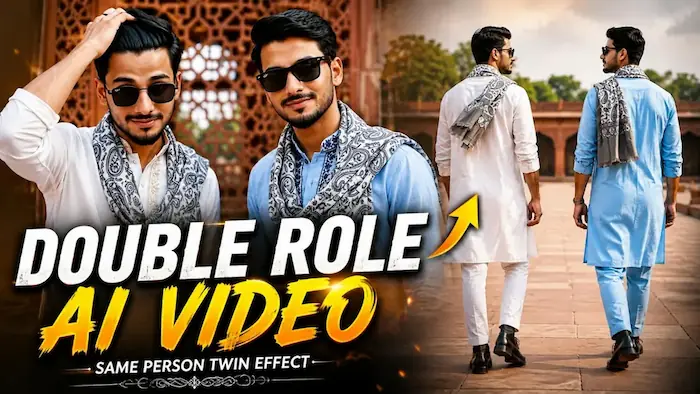
Is cinematic AI video prompt se Flow AI Video Generator mein ek hi uploaded person ka realistic Double Role / Twin Effect video create kiya ja sakta hai. Same person ko do alag roles mein ek hi cinematic scene ke andar naturally show kiya jaata hai.
Video mein dono characters ka exact same face, facial features, hairstyle, skin tone, body proportions aur natural appearance consistent maintain kiya jaata hai. Dono roles ko visually identical rakhte hue realistic interaction, natural body movement aur cinematic camera angles create kiye jaate hain.
Flow AI ke through same person ka Twin Effect, Double Character Effect, cinematic interaction aur professional live-action style generate kiya ja sakta hai.
Ultra-realistic skin texture, realistic hands, natural expressions, smooth camera movement, cinematic depth of field, premium colour grading aur 8K-quality visual detail video ko real professionally filmed footage jaisa look dete hain.
Ye Double Role AI Video, Same Person Twin Effect, Flow AI Editing, AI Video Generator, Cinematic AI Video aur Viral AI Video content ke liye perfect hai.
AI Video Prompt
✦AI VIDEO PROMPT
Use the uploaded reference photo for the man's face, hairstyle, skin tone, body build and height. Generate TWO identical versions of this same person appearing together in the same frame, side by side, as a double-role/twin effect. Both figures must have the exact same face, hairstyle, skin tone, and body proportions as the reference photo — only the outfit color/embroidery differs between them, the face and body remain identical. Keep body proportions natural and realistic for both figures, matching the exact build shown in the reference photo — do not add extra muscle, height, or bulk to either figure.
OUTFITS (different embroidery for each figure, same throughout the video — do not change mid-video):
- Figure 1: white kurta with light golden-beige embroidery on the collar and front placket, rolled-up sleeves, a printed grey-and-white paisley muffler draped over one shoulder.
- Figure 2: light blue kurta with dark navy-blue embroidery on the collar and front placket, rolled-up sleeves, a printed grey-and-white paisley muffler draped over one shoulder.
Both figures wear matching jelly-sole boots (same style and color for both), and a black watch on the wrist. The muffler must remain on both figures in every scene — do not remove it at any point.
IMPORTANT — LOCATION LOCK: All 8 scenes take place at the SAME single location — an outdoor heritage monument courtyard, red sandstone architecture with carved lattice (jaali) walls, green trees and open sky in the background, soft natural daylight. This exact location must repeat identically in every single scene below — do not change the background, architecture, or lighting at any point.
Color grade: warm-neutral cinematic tone, soft natural lighting, consistent across all scenes.
8 CINEMATIC SCENES (all at the same red sandstone monument courtyard location):
1. Low-angle close shot of both figures' feet and legs walking together in sync, jelly-sole boots clearly visible, red sandstone floor, carved wooden railing in background.
2. Close-up shot of both figures' wrists, hands relaxed and open, each showing their own black watch clearly on the wrist, muffler visible draping down near the arm, same red sandstone jaali wall visible behind them.
3. Medium shot from behind, both figures standing side by side looking out at the same courtyard view, hair and muffler moving gently in the breeze, embroidery on kurtas visible.
4. Medium shot, both figures standing side by side wearing sunglasses, looking to the side with a confident expression, muffler clearly draped on both, same monument architecture blurred in background.
5. Close-up shot, both figures standing close together, one adjusting his hair with his hand, both looking directly at the camera, muffler visible on shoulders, same red sandstone wall behind them.
6. Full body shot, both figures walking together toward the camera, jelly boots, different kurta embroidery, and muffler clearly visible on both, same courtyard floor and railing visible.
7. Medium close shot, both figures turning to look at each other and smiling, muffler draped on both shoulders, same red sandstone jaali wall in background.
8. Wide shot, both figures standing together facing the camera with arms relaxed, muffler visible on both, full monument courtyard visible behind them exactly as in previous scenes, calm confident finishing pose.
FORMAT: 16:9 landscape, 1080p resolution, smooth cinematic pacing with synchronized movement between both figures throughout, same location maintained from Scene 1 to Scene 8.
WATERMARK: Small semi-transparent text "NoorEdiz07" in the bottom-right corner, visible consistently across all 8 scenes.
Use the uploaded reference photo for the man's face, hairstyle, skin tone, body build and height. Generate TWO identical versions of this same person appearing together in the same frame, side by side, as a double-role/twin effect. Both figures must have the exact same face, hairstyle, skin tone, and body proportions as the reference photo — only the outfit color/embroidery differs between them, the face and body remain identical.
NATURAL BUILD:
Keep body proportions natural and realistic for both figures, matching the exact build shown in the reference photo — do not add extra muscle, height, or bulk to either figure.
OUTFITS (different embroidery for each figure, same throughout the video — do not change mid-video):
- Figure 1: white kurta with light golden-beige embroidery on the collar and front placket, rolled-up sleeves, a printed grey-and-white paisley muffler draped over one shoulder.
- Figure 2: light blue kurta with dark navy-blue embroidery on the collar and front placket, rolled-up sleeves, a printed grey-and-white paisley muffler draped over one shoulder.
Both figures wear matching jelly-sole boots (same style and color for both), and a black watch on the wrist.
The muffler must remain on both figures in every scene — do not remove it at any point.
LOCATION LOCK (all 8 scenes):
All 8 scenes take place at the SAME single location — an outdoor heritage monument courtyard, red sandstone architecture with carved lattice (jaali) walls, green trees and open sky in the background, soft natural daylight.
This exact location must repeat identically in every single scene below — do not change the background, architecture, or lighting at any point.
COLOR GRADE:
Warm-neutral cinematic tone, soft natural lighting, consistent across all scenes.
8 CINEMATIC SCENES (all at the same red sandstone monument courtyard location):
Scene 1 (walking feet): Low-angle close shot of both figures' feet and legs walking together in sync, jelly-sole boots clearly visible, red sandstone floor, carved wooden railing in background.
Scene 2 (close wristwatches): Close-up shot of both figures' wrists, hands relaxed and open (not clapping or touching each other), each showing their own black watch clearly on the wrist, muffler visible draping down near the arm, same red sandstone jaali wall visible behind them.
Scene 3 (medium from behind): Medium shot from behind, both figures standing side by side looking out at the same courtyard view, hair and muffler moving gently in the breeze, embroidery on kurtas visible.
Scene 4 (medium with sunglasses): Medium shot, both figures standing side by side wearing sunglasses, looking to the side with a confident expression, muffler clearly draped on both, same monument architecture blurred in background.
Scene 5 (close adjusting hair): Close-up shot, both figures standing close together, one adjusting his hair with his hand, both looking directly at the camera, muffler visible on shoulders, same red sandstone wall behind them.
Scene 6 (full body walking): Full body shot, both figures walking together toward the camera, jelly boots, different kurta embroidery, and muffler clearly visible on both, same courtyard floor and railing visible.
Scene 7 (medium smiling at each other): Medium close shot, both figures turning to look at each other and smiling, muffler draped on both shoulders, same red sandstone jaali wall in background.
Scene 8 (wide confidence pose): Wide shot, both figures standing together facing the camera with arms relaxed, muffler visible on both, full monument courtyard visible behind them exactly as in previous scenes, calm confident finishing pose.
FORMAT:
16:9 landscape.
1080p resolution.
Smooth cinematic pacing with synchronized movement between both figures throughout, same location maintained from Scene 1 to Scene 8.
WATERMARK:
Small semi-transparent text "NoorEdiz07" in the bottom-right corner, visible consistently across all 8 scenes.
✓
Prompt copied to clipboard!
AI Video Prompt
✦AI VIDEO PROMPT
Use the uploaded reference photo for the man's face, hairstyle, skin tone, body build and height. Generate TWO identical versions of this same person appearing together in the same frame, side by side, as a double-role/twin effect. Both figures must have the exact same face, hairstyle, skin tone, and body proportions as the reference photo — only the outfit color/embroidery differs between them, the face and body remain identical. Keep body proportions natural and realistic for both figures, matching the exact build shown in the reference photo — do not add extra muscle, height, or bulk to either figure.
OUTFITS (different embroidery for each figure, same throughout the video — do not change mid-video):
- Figure 1: white kurta with light golden-beige embroidery on the collar and front placket, rolled-up sleeves, a printed grey-and-white paisley muffler draped over one shoulder.
- Figure 2: light blue kurta with dark navy-blue embroidery on the collar and front placket, rolled-up sleeves, a printed grey-and-white paisley muffler draped over one shoulder.
Both figures wear matching jelly-sole boots (same style and color for both), and a black watch on the wrist. The muffler must remain on both figures in every scene — do not remove it at any point.
IMPORTANT — LOCATION LOCK: All 8 scenes take place at the SAME single location — an outdoor heritage monument courtyard, red sandstone architecture with carved lattice (jaali) walls, green trees and open sky in the background, soft natural daylight. This exact location must repeat identically in every single scene below — do not change the background, architecture, or lighting at any point.
Color grade: warm-neutral cinematic tone, soft natural lighting, consistent across all scenes.
8 CINEMATIC SCENES (all at the same red sandstone monument courtyard location):
1. Low-angle close shot of both figures' feet and legs walking together in sync, jelly-sole boots clearly visible, red sandstone floor, carved wooden railing in background.
2. Close-up shot of both figures' wrists, hands relaxed and open, each showing their own black watch clearly on the wrist, muffler visible draping down near the arm, same red sandstone jaali wall visible behind them.
3. Medium shot from behind, both figures standing side by side looking out at the same courtyard view, hair and muffler moving gently in the breeze, embroidery on kurtas visible.
4. Medium shot, both figures standing side by side wearing sunglasses, looking to the side with a confident expression, muffler clearly draped on both, same monument architecture blurred in background.
5. Close-up shot, both figures standing close together, one adjusting his hair with his hand, both looking directly at the camera, muffler visible on shoulders, same red sandstone wall behind them.
6. Full body shot, both figures walking together toward the camera, jelly boots, different kurta embroidery, and muffler clearly visible on both, same courtyard floor and railing visible.
7. Medium close shot, both figures turning to look at each other and smiling, muffler draped on both shoulders, same red sandstone jaali wall in background.
8. Wide shot, both figures standing together facing the camera with arms relaxed, muffler visible on both, full monument courtyard visible behind them exactly as in previous scenes, calm confident finishing pose.
FORMAT: 16:9 landscape, 1080p resolution, smooth cinematic pacing with synchronized movement between both figures throughout, same location maintained from Scene 1 to Scene 8.
WATERMARK: Small semi-transparent text "NoorEdiz07" in the bottom-right corner, visible consistently across all 8 scenes.
Use the uploaded reference photo for the man's face, hairstyle, skin tone, body build and height. Generate TWO identical versions of this same person appearing together in the same frame, side by side, as a double-role/twin effect. Both figures must have the exact same face, hairstyle, skin tone, and body proportions as the reference photo — only the outfit color/embroidery differs between them, the face and body remain identical.
NATURAL BUILD:
Keep body proportions natural and realistic for both figures, matching the exact build shown in the reference photo — do not add extra muscle, height, or bulk to either figure.
OUTFITS (different embroidery for each figure, same throughout the video — do not change mid-video):
- Figure 1: white kurta with light golden-beige embroidery on the collar and front placket, rolled-up sleeves, a printed grey-and-white paisley muffler draped over one shoulder.
- Figure 2: light blue kurta with dark navy-blue embroidery on the collar and front placket, rolled-up sleeves, a printed grey-and-white paisley muffler draped over one shoulder.
Both figures wear matching jelly-sole boots (same style and color for both), and a black watch on the wrist.
The muffler must remain on both figures in every scene — do not remove it at any point.
LOCATION LOCK (all 8 scenes):
All 8 scenes take place at the SAME single location — an outdoor heritage monument courtyard, red sandstone architecture with carved lattice (jaali) walls, green trees and open sky in the background, soft natural daylight.
This exact location must repeat identically in every single scene below — do not change the background, architecture, or lighting at any point.
COLOR GRADE:
Warm-neutral cinematic tone, soft natural lighting, consistent across all scenes.
8 CINEMATIC SCENES (all at the same red sandstone monument courtyard location):
Scene 1 (walking feet): Low-angle close shot of both figures' feet and legs walking together in sync, jelly-sole boots clearly visible, red sandstone floor, carved wooden railing in background.
Scene 2 (close wristwatches): Close-up shot of both figures' wrists, hands relaxed and open (not clapping or touching each other), each showing their own black watch clearly on the wrist, muffler visible draping down near the arm, same red sandstone jaali wall visible behind them.
Scene 3 (medium from behind): Medium shot from behind, both figures standing side by side looking out at the same courtyard view, hair and muffler moving gently in the breeze, embroidery on kurtas visible.
Scene 4 (medium with sunglasses): Medium shot, both figures standing side by side wearing sunglasses, looking to the side with a confident expression, muffler clearly draped on both, same monument architecture blurred in background.
Scene 5 (close adjusting hair): Close-up shot, both figures standing close together, one adjusting his hair with his hand, both looking directly at the camera, muffler visible on shoulders, same red sandstone wall behind them.
Scene 6 (full body walking): Full body shot, both figures walking together toward the camera, jelly boots, different kurta embroidery, and muffler clearly visible on both, same courtyard floor and railing visible.
Scene 7 (medium smiling at each other): Medium close shot, both figures turning to look at each other and smiling, muffler draped on both shoulders, same red sandstone jaali wall in background.
Scene 8 (wide confidence pose): Wide shot, both figures standing together facing the camera with arms relaxed, muffler visible on both, full monument courtyard visible behind them exactly as in previous scenes, calm confident finishing pose.
FORMAT:
16:9 landscape.
1080p resolution.
Smooth cinematic pacing with synchronized movement between both figures throughout, same location maintained from Scene 1 to Scene 8.
WATERMARK:
Small semi-transparent text "NoorEdiz07" in the bottom-right corner, visible consistently across all 8 scenes.
Double Role AI VideoDouble Role VideoSame Person Twin EffectTwin Effect AI VideoTwin AI VideoFlow AI VideoFlow AI Video GeneratorFlow AI PromptFlow AI Video PromptFlow AI EditingFlow AI Editing Tutorial
Double Role AI VideoDouble Role VideoSame Person Twin EffectTwin Effect AI VideoTwin AI VideoFlow AI VideoFlow AI Video GeneratorFlow AI PromptFlow AI Video PromptFlow AI EditingFlow AI Editing Tutorial
Royal Enfield Night Ride & 1980s Retro AI Photo Editing Tutorial
AI editing makes it possible to transform an ordinary reference photo into both a cinematic motorcycle video and a nostalgic vintage portrait. In this tutorial, you can learn two creative techniques: creating a Royal Enfield Night Ride cinematic video with Flow AI and transforming a normal photo into an authentic 1980s retro photograph with ChatGPT. Both methods focus on maintaining the person’s original identity while changing the environment, styling, lighting, and overall visual atmosphere.
1. Create a Royal Enfield Night Ride AI Video
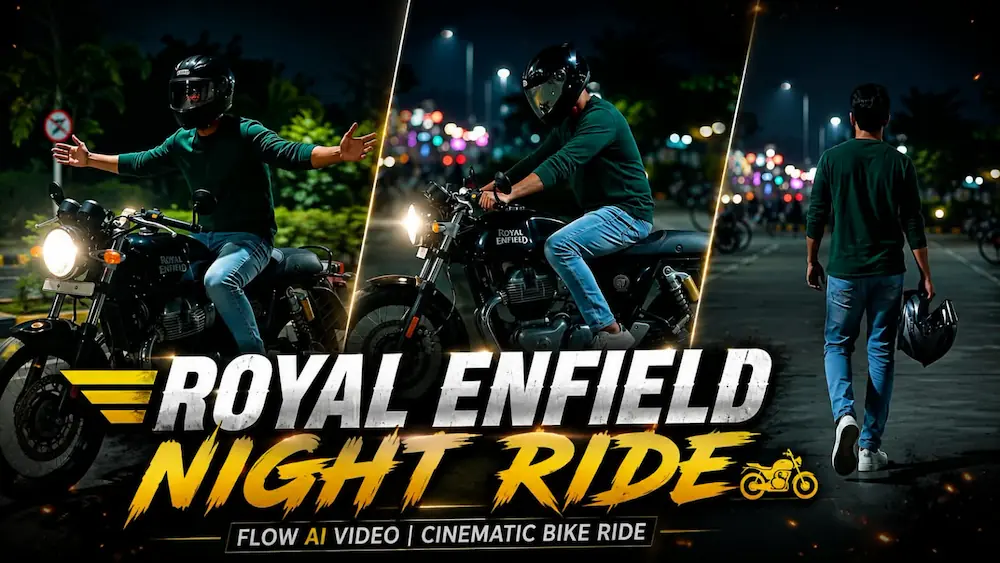
The Royal Enfield Night Ride concept uses Flow AI Video Generator to create an ultra-realistic 4K cinematic motorcycle sequence. Start by uploading a clear reference photo of the person. The prompt is designed to preserve the exact face, facial features, natural skin, body type, hairstyle, and proportions throughout the complete video.
The rider wears a dark green full-sleeve shirt, light-blue denim jeans, white sneakers, and a premium full-face helmet. The motorcycle remains the same black Royal Enfield Continental GT 650 throughout the story. The video uses a 16:9 widescreen composition and follows a seven-scene cinematic sequence.
The story begins with the rider walking through a dark parking area while carrying his helmet. He then sits on the motorcycle, followed by close-up shots of the handlebar, dashboard, headlight, engine, and front wheel. The later scenes show him riding along an empty palm-lined road before finishing with a dynamic low-angle curve and acceleration shot toward distant city lights.
For the best result, select the highest available quality setting and carefully check facial identity, motorcycle consistency, hands, fingers, legs, riding posture, reflections, headlights, camera movement, and scene transitions. The prompt also uses cool blue-green tones with warm highlights, realistic shadows, motion blur, atmospheric depth, and cinematic night lighting.
2. Create a 1980s Retro AI Photo
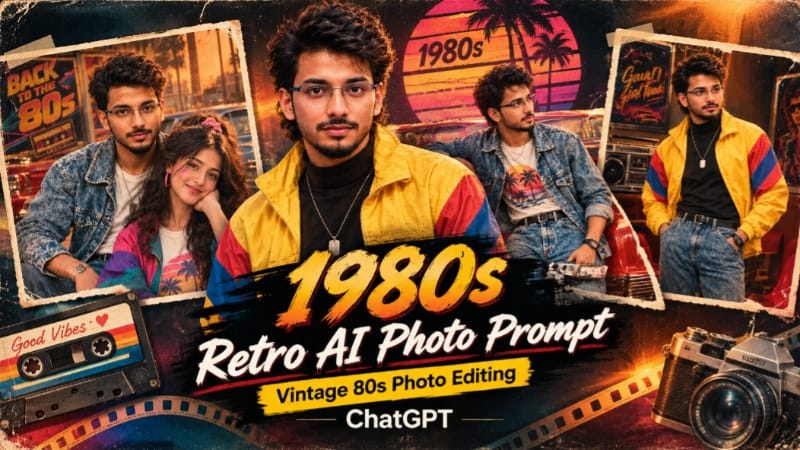
The second technique uses ChatGPT to transform a modern photograph into an authentic-looking 1980s film portrait. Upload a clear reference image and use the detailed retro AI photo prompt. The original face, body shape, skin tone, pose, hand gestures, and proportions should remain recognizable while the visual era is completely transformed.
The retro design can include vintage cassette boomboxes, classic cars, retro travel posters, palm trees, neon signs, old-style interiors, and warm golden-hour backgrounds. Clothing can be redesigned with authentic 1980s fashion such as acid-wash denim, colour-block windbreakers, oversized blazers, high-waisted jeans, leather belts, and retro graphic T-shirts.
For the final image, use a 4:5 composition with ultra-realistic 8K detail. Add warm faded colours, subtle analogue film grain, soft vignette, amber highlights, muted shadows, and a slightly worn vintage photo border. Natural skin texture and realistic fabric details should remain visible, avoiding plastic or overly smooth AI-looking skin.
Final Result
With the correct reference photo and detailed prompt, Flow AI can create a premium cinematic Royal Enfield night ride, while ChatGPT can recreate the same person in a convincing 1980s photographic style. The key to both edits is strong identity preservation, realistic details, consistent styling, and controlled cinematic lighting.