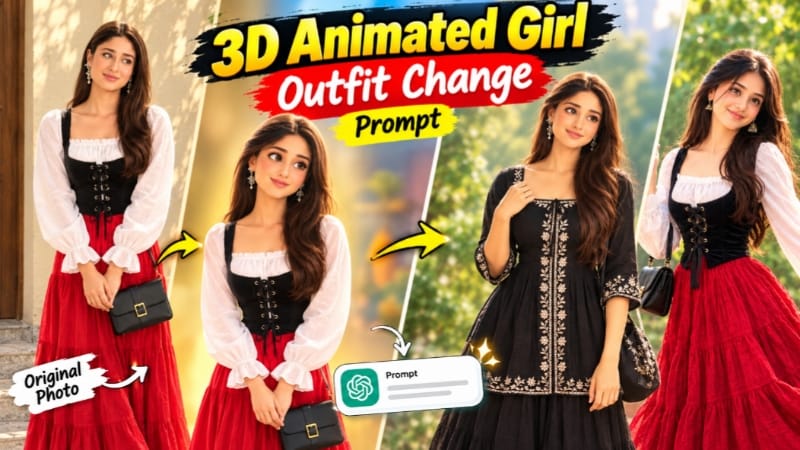
3D Animated Girl Outfit Change Prompt for ChatGPT AI Photo Editing
AI photo editing makes it possible to experiment with different outfits while keeping the original character, pose and background as consistent as possible. With ChatGPT's image editing capabilities, you can provide a character reference image and a separate outfit reference image to guide the editing process.
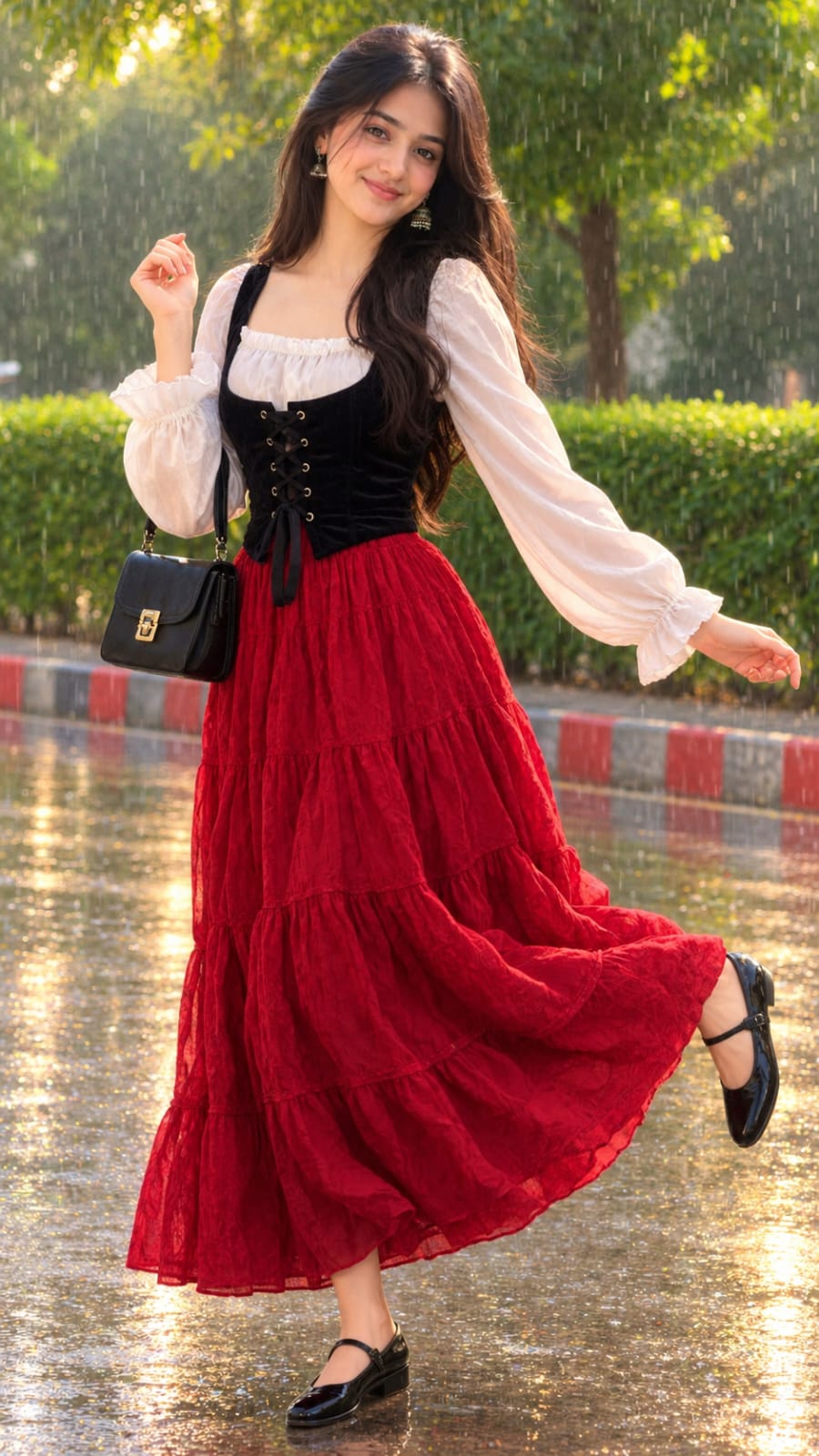
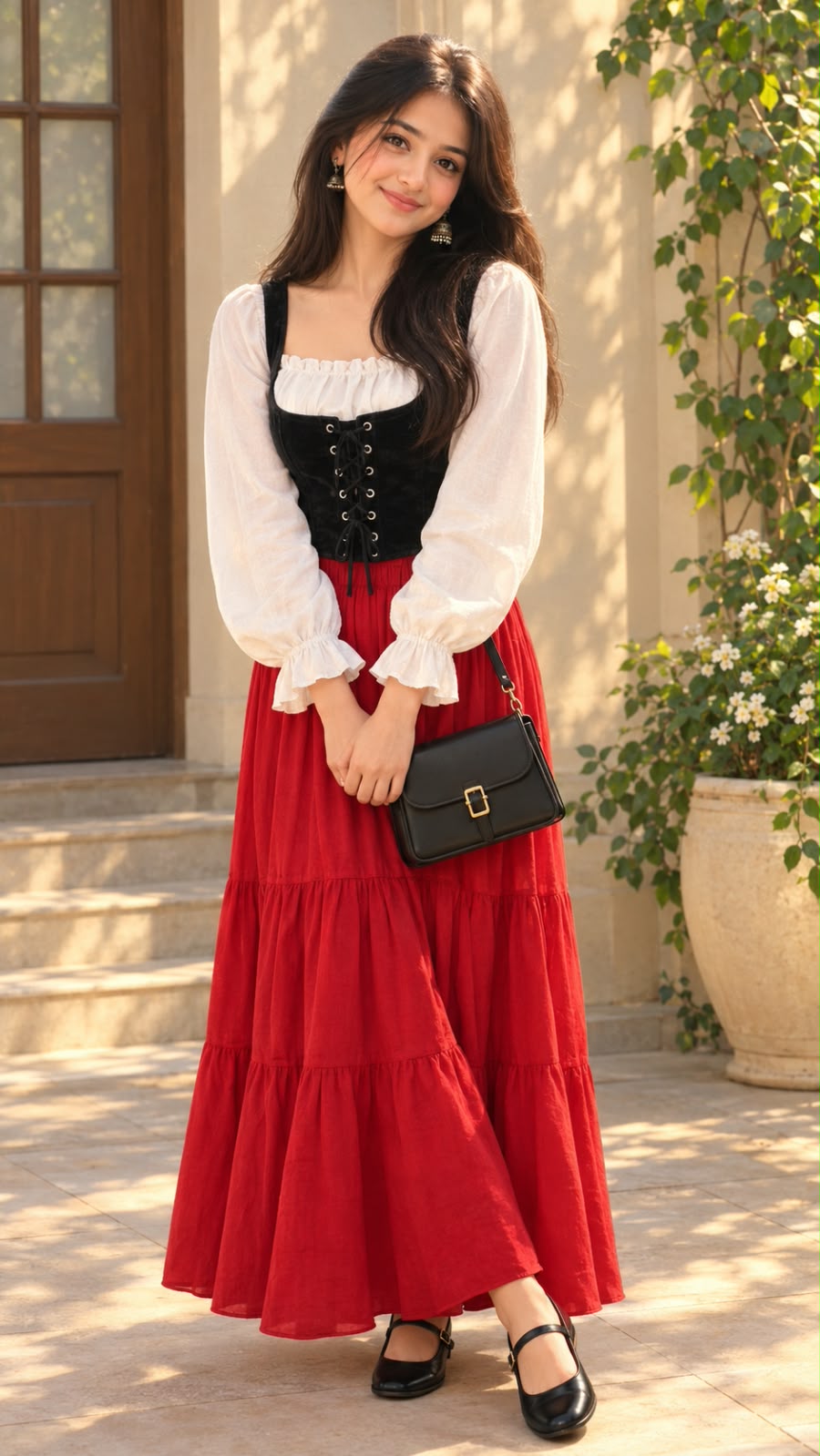
The 3D Animated Girl Outfit Change Prompt is designed for creators who want to change a character's clothing without redesigning the entire image. It describes a polished 3D animated girl with long wavy brown hair, expressive eyes and a gentle smile. The new outfit combines a white ruffle blouse, a black corset-style vest, a bright red tiered maxi skirt, a black handbag and black Mary Jane shoes.
The main goal is to preserve the original character's appearance, pose, environment and lighting while changing only the outfit. This guide explains the prompt's features and how to use it with ChatGPT.
What Is a 3D Animated Girl Outfit Change Prompt?
A 3D animated girl outfit change prompt is a set of instructions that tells an AI image editor how to replace clothing in an existing character image. Instead of generating a completely new character, the prompt asks the tool to use the original image as the primary reference and another image as a guide for the replacement outfit.
This approach is useful when you like a character's facial features, hairstyle, expression and background but want to experiment with a different fashion style.
In this prompt, Image 1 provides the character and composition reference, while Image 2 provides the clothing reference. Keeping these roles separate helps communicate which elements should remain unchanged and which details should be modified.
AI editing results can vary, so it is important to review the final image to confirm that the character still resembles the reference.
Main Features of This AI Photo Editing Prompt
1. Original 3D Animated Character
The prompt asks the editor to preserve the girl from Image 1, including her long, wavy, dark brown hair, large dark brown eyes, rosy cheeks and soft smile.
The character's polished 3D animated appearance is an important part of the design. Smooth shading, expressive eyes and carefully rendered details should remain consistent with the original artwork.
The instructions also ask the editor to retain the character's original proportions and recognizable facial features rather than creating a different girl.
2. White Ruffle Blouse
The replacement outfit includes a white blouse with a square neckline, a gathered ruffle around the neckline and long puffed sleeves. The frilled cuffs add a delicate fashion detail that complements the animated character.
The prompt describes the neckline and sleeve construction so the editor has a clearer idea of the intended garment. Matching these details to the outfit reference can help create a more cohesive result.
3. Black Corset-Style Vest
A black velvet corset-style vest sits over the white blouse. It has wide shoulder straps, front eyelets and a black ribbon lace-up design.
The contrast between the black vest and white blouse gives the outfit a distinctive layered appearance. The prompt also requests realistic fabric texture and natural folds so the clothing looks integrated with the character rather than pasted over the original image.
4. Bright Red Tiered Maxi Skirt
The long red skirt is one of the most noticeable elements of the new outfit. It features multiple gathered tiers, a flowing flared shape and an ankle-length design.
The prompt asks the editor to make the skirt follow the original character's body position and the natural direction of the fabric folds. This helps preserve the overall silhouette while changing the clothing.
Because the skirt is a strong visual feature, checking its colour, length and tier structure is an important part of reviewing the generated image.
5. Black Handbag and Mary Jane Shoes
The outfit reference also includes a structured black shoulder handbag with a gold buckle and black leather Mary Jane flat shoes with a front strap.
These accessories complete the look and help the final image match the intended fashion design. The handbag should appear naturally positioned without unnecessarily changing the character's original pose.
The shoes should remain visible near the character's feet, with proportions that fit the original full-body composition.
6. Original Pose and Expression
The character stands with her body slightly angled, her head tilted gently to one side and her hands clasped at waist level. Her legs cross at the ankles, creating a shy and graceful posture.
The prompt asks the editor to preserve this pose rather than generating a new stance to accommodate the outfit.
However, accessories and clothing can sometimes affect the hands or body position during AI editing. Review these areas carefully after generation.
7. Warm Courtyard Background
The background contains a warm cream-beige wall, a wooden door with frosted glass panes, stone steps, a cream planter, white flowers and green climbing plants.
The light beige tiled courtyard floor includes patches of dappled sunlight. The prompt requests that all these details remain unchanged.
Preserving the background is important because the goal is an outfit edit, not a new scene. If the AI modifies the door, planter or surrounding architecture, another editing attempt may be necessary.
8. Warm Golden-Hour Lighting
The original image uses warm golden-hour sunlight with soft shadows from nearby leaves. The prompt asks for the same lighting direction, colour temperature and overall colour grading after the outfit change.
The new clothing should respond naturally to the scene's lighting. For example, the red skirt should have appropriate highlights and shadows, while the black velvet vest should retain enough detail to distinguish its texture.
Matching the lighting across the character and clothing can make the edit look more natural.
9. Vertical 9:16 Composition
The requested aspect ratio is 9:16, with a target resolution of 1080 × 1920 pixels. This format is suitable for vertical social media content, mobile wallpapers and character-editing demonstrations.
The prompt requests high detail and sharpness, but the actual resolution depends on the image generation tool. If the generated image has a different aspect ratio or lower resolution, you may need to crop, resize or upscale it separately.
How Image 1 and Image 2 Work Together
The two images have different roles in this workflow.
Image 1 — Character reference: This image supplies the girl's original face, hairstyle, pose, background, camera angle and lighting.
Image 2 — Outfit reference: This image supplies the desired clothing design, including the blouse, corset vest, red skirt, handbag and shoes.
The prompt asks the editor to preserve the first image's composition while borrowing only the outfit details from the second image. Clear instructions are especially helpful when the two references have different poses or backgrounds.
Although this method can improve consistency, an AI editor may still modify small details. Compare the final result with both references before using the image.
Why Use ChatGPT for Outfit Editing?
ChatGPT's image generation and editing features allow users to describe visual changes in natural language. Rather than manually reconstructing an outfit, you can provide reference images and explain which details should change.
You can also refine the result with follow-up instructions. For example, if the skirt becomes too short, the black vest loses its lace-up design or the background changes unexpectedly, you can ask for a correction focused on that specific issue.
Feature availability and the controls offered may vary by account and interface. The best results generally come from clear reference images, precise instructions and a careful review of the generated image.
Tips for Better Results
Choose a clear character reference in which the face, full outfit area, hands and feet are visible. The outfit reference should also show the important garment details, such as the blouse neckline, vest lacing, skirt tiers and accessories.
Upload both images together and clearly identify their purposes. Keep the editing instructions focused on the requested clothing change instead of adding unrelated changes to the scene.
After generation, inspect the face, hairstyle, hands, skirt length, handbag placement and shoes. Check that the background still contains the original door, steps, planter and plants.
If the result changes the character too much, ask the editor to restore the original facial features, pose and composition while keeping the new outfit. You may also use a separate image editor for small corrections.
Where Can You Use the Edited Image?
The finished image can be used for creative character design, fashion concepts, animated-style social media posts, digital art collections and AI editing tutorials.
If you publish the image on a website, provide an original description and useful instructions rather than relying only on a prompt and repeated keywords. When appropriate, identify the image as AI-edited or AI-generated so viewers understand how it was created.
Final Thoughts
The 3D Animated Girl Outfit Change Prompt provides a structured way to experiment with a new fashion look while retaining the original character's style. It combines a white ruffle blouse, black corset-style vest, bright red tiered maxi skirt, structured handbag and Mary Jane shoes with a warm courtyard setting.
Upload Image 1 as the character reference and Image 2 as the outfit reference, paste the complete prompt into a compatible ChatGPT image editing workflow and review the result. If necessary, make focused corrections to preserve the character, background and outfit details.
For more AI photo editing prompts, character design ideas and creative tutorials, explore NoorEditing07.com.
AI Photograph Prompt Card
✦AI PHOTO PROMPT
Image 1 is the base photo. Image 2 is the outfit reference. Recreate Image 1 exactly (same 3D animated character, same face, same hair, same pose, same background, same camera angle, same lighting and same color grading), and change ONLY the outfit to the outfit from Image 2. Vertical 9:16 (1080x1920), ultra-sharp 8K HD quality, high detail, stays crisp when zoomed in. STYLE: Same polished 3D animated, Pixar-like character style as Image 1, with smooth skin, big expressive dark brown eyes and soft realistic shading. Do not change the art style. CHARACTER: Same girl as Image 1. Long, wavy, dark black hair falling over her shoulders and back, big dark brown eyes, rosy cheeks, a bright happy smile, small drop earrings. POSE: Same as Image 1. She is full-body in a playful, dancing, mid-step pose with her body slightly angled.
Image 1 is the base photo. Image 2 is the outfit reference. Recreate Image 1 exactly (same 3D animated character, same face, same hair, same pose, same background, same camera angle, same lighting and same color grading), and change ONLY the outfit to the outfit from Image 2. Vertical 9:16 (1080x1920), ultra-sharp 8K HD quality, high detail, stays crisp when zoomed in.
STYLE: Same polished 3D animated, Pixar-like character style as Image 1, with smooth skin, big expressive dark brown eyes and soft realistic shading. Do not change the art style.
CHARACTER: Same girl as Image 1. Long, wavy, dark black hair falling over her shoulders and back, big dark brown eyes, rosy cheeks, a bright happy smile, small drop earrings.
POSE: Same as Image 1. She is full-body in a playful, dancing, mid-step pose with her body slightly angled. Her right hand is raised near her shoulder with the fingers softly curled, and her left arm is stretched out to the side with the palm open. One foot is lifted and pointed, in a cheerful, carefree, graceful posture, looking at the camera.
NEW OUTFIT (from Image 2):
- A white blouse with a square neckline, a gathered ruffle at the neckline, and long puffed sleeves with frilled cuffs. The sleeves flow naturally with her stretched-out arm.
- Over it, a black velvet corset-style vest with wide shoulder straps and front lace-up eyelets with a black ribbon tie.
- A long, bright red tiered maxi skirt with a flowing, flared, gathered fit, falling to the ankles. The skirt sways naturally with her dancing movement and replaces the navy blue salwar completely.
- Black leather Mary Jane flat shoes with a front strap, visible at the feet, replacing the silver flats.
- A small black structured handbag with a gold buckle, hanging on her forearm or shoulder, without changing her dancing pose. Keep it small and close to her body.
Match the fabric texture, colors and details exactly as in Image 2. The new outfit completely replaces the navy blue printed kurta, salwar and silver shoes.
BACKGROUND: Same as Image 1. A rainy park with lush green trees, a trimmed green hedge, a red and grey striped curb, and a wet road with shiny puddles and reflections. Light rain falling, softly blurred with shallow depth of field.
LIGHTING AND COLOR: Same as Image 1. Soft golden sunlight breaking through the trees, with sparkling reflections on the wet ground and gentle shadows. The same light direction and warmth fall on the character, the new outfit and the background. Same warm, vibrant color grading.
BLENDING: The new outfit fits the body naturally, with correct folds, shadows and fabric texture, no pasted look and no visible seam. Skin tone and lighting match across the face, neck, arms and hands.
NO: white top border, text, watermark, extra people, distortion, extra fingers.
✓
Prompt copied to clipboard!
AI Photograph Prompt Card
✦AI PHOTO PROMPT
Image 1 is the base photo. Image 2 is the outfit reference. Recreate Image 1 exactly (same 3D animated character, same face, same hair, same pose, same background, same camera angle, same lighting and same color grading), and change ONLY the outfit to the outfit from Image 2. Vertical 9:16 (1080x1920), ultra-sharp 8K HD quality, high detail, stays crisp when zoomed in. STYLE: Same polished 3D animated, Pixar-like character style as Image 1, with smooth skin, big expressive dark brown eyes and soft realistic shading. Do not change the art style. CHARACTER: Same girl as Image 1. Long, wavy, dark black hair falling over her shoulders and back, big dark brown eyes, rosy cheeks, a bright happy smile, small drop earrings. POSE: Same as Image 1. She is full-body in a playful, dancing, mid-step pose with her body slightly angled.
Image 1 is the base photo. Image 2 is the outfit reference. Recreate Image 1 exactly (same 3D animated character, same face, same hair, same pose, same background, same camera angle, same lighting and same color grading), and change ONLY the outfit to the outfit from Image 2. Vertical 9:16 (1080x1920), ultra-sharp 8K HD quality, high detail, stays crisp when zoomed in.
STYLE: Same polished 3D animated, Pixar-like character style as Image 1, with smooth skin, big expressive dark brown eyes and soft realistic shading. Do not change the art style.
CHARACTER: Same girl as Image 1. Long, wavy, dark black hair falling over her shoulders and back, big dark brown eyes, rosy cheeks, a bright happy smile, small drop earrings.
POSE: Same as Image 1. She is full-body in a playful, dancing, mid-step pose with her body slightly angled. Her right hand is raised near her shoulder with the fingers softly curled, and her left arm is stretched out to the side with the palm open. One foot is lifted and pointed, in a cheerful, carefree, graceful posture, looking at the camera.
NEW OUTFIT (from Image 2):
- A white blouse with a square neckline, a gathered ruffle at the neckline, and long puffed sleeves with frilled cuffs. The sleeves flow naturally with her stretched-out arm.
- Over it, a black velvet corset-style vest with wide shoulder straps and front lace-up eyelets with a black ribbon tie.
- A long, bright red tiered maxi skirt with a flowing, flared, gathered fit, falling to the ankles. The skirt sways naturally with her dancing movement and replaces the navy blue salwar completely.
- Black leather Mary Jane flat shoes with a front strap, visible at the feet, replacing the silver flats.
- A small black structured handbag with a gold buckle, hanging on her forearm or shoulder, without changing her dancing pose. Keep it small and close to her body.
Match the fabric texture, colors and details exactly as in Image 2. The new outfit completely replaces the navy blue printed kurta, salwar and silver shoes.
BACKGROUND: Same as Image 1. A rainy park with lush green trees, a trimmed green hedge, a red and grey striped curb, and a wet road with shiny puddles and reflections. Light rain falling, softly blurred with shallow depth of field.
LIGHTING AND COLOR: Same as Image 1. Soft golden sunlight breaking through the trees, with sparkling reflections on the wet ground and gentle shadows. The same light direction and warmth fall on the character, the new outfit and the background. Same warm, vibrant color grading.
BLENDING: The new outfit fits the body naturally, with correct folds, shadows and fabric texture, no pasted look and no visible seam. Skin tone and lighting match across the face, neck, arms and hands.
NO: white top border, text, watermark, extra people, distortion, extra fingers.
✓
Prompt copied to clipboard!
AI Photograph Prompt Card
✦AI PHOTO PROMPT
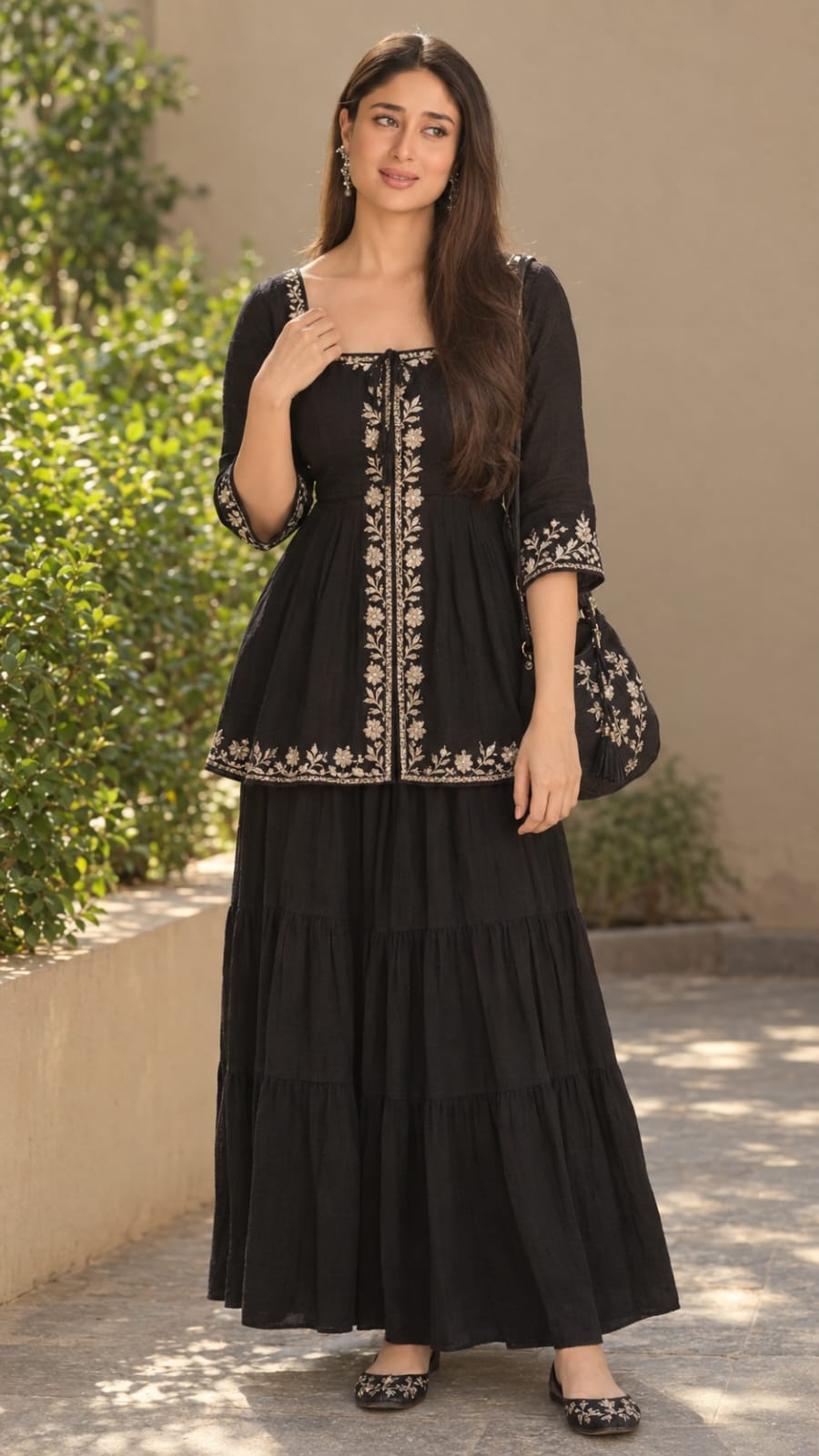
Image 1 is the outfit reference. Image 2 is the base photo. Recreate Image 2 exactly (same girl, same face, same long wavy dark hair, same pose, same background, same camera angle, same lighting and same color grading), and change ONLY the outfit to the outfit from Image 1. Vertical 9:16 (1080x1920), ultra-realistic, ultra-sharp 8K HD quality, high detail, stays crisp when zoomed in. SUBJECT: Same girl as Image 2. Long, wavy, dark black hair falling over her shoulders, soft natural makeup, a gentle smile, head slightly tilted. Keep her face exactly identical, do not beautify or alter it.
Image 1 is the outfit reference. Image 2 is the base photo. Recreate Image 2 exactly (same girl, same face, same long wavy dark hair, same pose, same background, same camera angle, same lighting and same color grading), and change ONLY the outfit to the outfit from Image 1. Vertical 9:16 (1080x1920), ultra-realistic, ultra-sharp 8K HD quality, high detail, stays crisp when zoomed in.
SUBJECT: Same girl as Image 2. Long, wavy, dark black hair falling over her shoulders, soft natural makeup, a gentle smile, head slightly tilted. Keep her face exactly identical, do not beautify or alter it.
POSE: Same as Image 2. She stands full-body, body slightly angled, her right hand holding the edge of the jacket-style collar area near the chest, and her left arm hanging relaxed at his side with the fingers gently curled. Relaxed, graceful, candid posture, looking at the camera.
NEW OUTFIT (from Image 1):
- A black cotton peplum-style tunic top with a square neckline, a small front tie at the neck, three-quarter sleeves, and a fitted waist that flares out gently at the hip.
- Cream and silver floral embroidery along the neckline panel, down the front center in a vertical leaf motif, on the sleeve cuffs, and along the hem border.
- A long, black, tiered maxi skirt in soft cotton with a gathered, flowing, flared fit, falling to the ankles.
- A black hobo-style shoulder bag with embroidered floral detailing and a small tassel, hanging naturally on her shoulder or forearm without changing her pose.
- Black leather flat shoes with embroidered patterns, visible at the feet.
Match the fabric texture, colors, embroidery and details exactly as in Image 1. The new outfit completely replaces the red dress, the denim jacket and the white heels.
BACKGROUND: Same as Image 2. A warm beige wall with a low planter wall on the left, lush green shrubs, a grey stone-tiled floor with dappled sunlight patches, softly blurred with shallow depth of field.
LIGHTING AND COLOR: Same as Image 2. Soft, warm, natural daylight with gentle shadows. The same light direction and warmth fall on her face, the new outfit and the background. Same natural, vibrant color grading.
BLENDING: The new outfit fits her body naturally, with correct folds, shadows and fabric texture, no pasted look and no visible seam. Skin tone and lighting match across the face, neck, arms and hands.
NO: text, watermark, extra people, distortion, extra fingers, change of face or background.
✓
Prompt copied to clipboard!
AI Photograph Prompt Card
✦AI PHOTO PROMPT
Image 1 is the outfit reference. Image 2 is the base photo. Recreate Image 2 exactly (same girl, same face, same long wavy dark hair, same pose, same background, same camera angle, same lighting and same color grading), and change ONLY the outfit to the outfit from Image 1. Vertical 9:16 (1080x1920), ultra-realistic, ultra-sharp 8K HD quality, high detail, stays crisp when zoomed in. SUBJECT: Same girl as Image 2. Long, wavy, dark black hair falling over her shoulders, soft natural makeup, a gentle smile, head slightly tilted. Keep her face exactly identical, do not beautify or alter it.
Image 1 is the outfit reference. Image 2 is the base photo. Recreate Image 2 exactly (same girl, same face, same long wavy dark hair, same pose, same background, same camera angle, same lighting and same color grading), and change ONLY the outfit to the outfit from Image 1. Vertical 9:16 (1080x1920), ultra-realistic, ultra-sharp 8K HD quality, high detail, stays crisp when zoomed in.
SUBJECT: Same girl as Image 2. Long, wavy, dark black hair falling over her shoulders, soft natural makeup, a gentle smile, head slightly tilted. Keep her face exactly identical, do not beautify or alter it.
POSE: Same as Image 2. She stands full-body, body slightly angled, her right hand holding the edge of the jacket-style collar area near the chest, and her left arm hanging relaxed at his side with the fingers gently curled. Relaxed, graceful, candid posture, looking at the camera.
NEW OUTFIT (from Image 1):
- A black cotton peplum-style tunic top with a square neckline, a small front tie at the neck, three-quarter sleeves, and a fitted waist that flares out gently at the hip.
- Cream and silver floral embroidery along the neckline panel, down the front center in a vertical leaf motif, on the sleeve cuffs, and along the hem border.
- A long, black, tiered maxi skirt in soft cotton with a gathered, flowing, flared fit, falling to the ankles.
- A black hobo-style shoulder bag with embroidered floral detailing and a small tassel, hanging naturally on her shoulder or forearm without changing her pose.
- Black leather flat shoes with embroidered patterns, visible at the feet.
Match the fabric texture, colors, embroidery and details exactly as in Image 1. The new outfit completely replaces the red dress, the denim jacket and the white heels.
BACKGROUND: Same as Image 2. A warm beige wall with a low planter wall on the left, lush green shrubs, a grey stone-tiled floor with dappled sunlight patches, softly blurred with shallow depth of field.
LIGHTING AND COLOR: Same as Image 2. Soft, warm, natural daylight with gentle shadows. The same light direction and warmth fall on her face, the new outfit and the background. Same natural, vibrant color grading.
BLENDING: The new outfit fits her body naturally, with correct folds, shadows and fabric texture, no pasted look and no visible seam. Skin tone and lighting match across the face, neck, arms and hands.
NO: text, watermark, extra people, distortion, extra fingers, change of face or background.
✓
Prompt copied to clipboard!
AI Photograph Prompt Card
✦AI PHOTO PROMPT
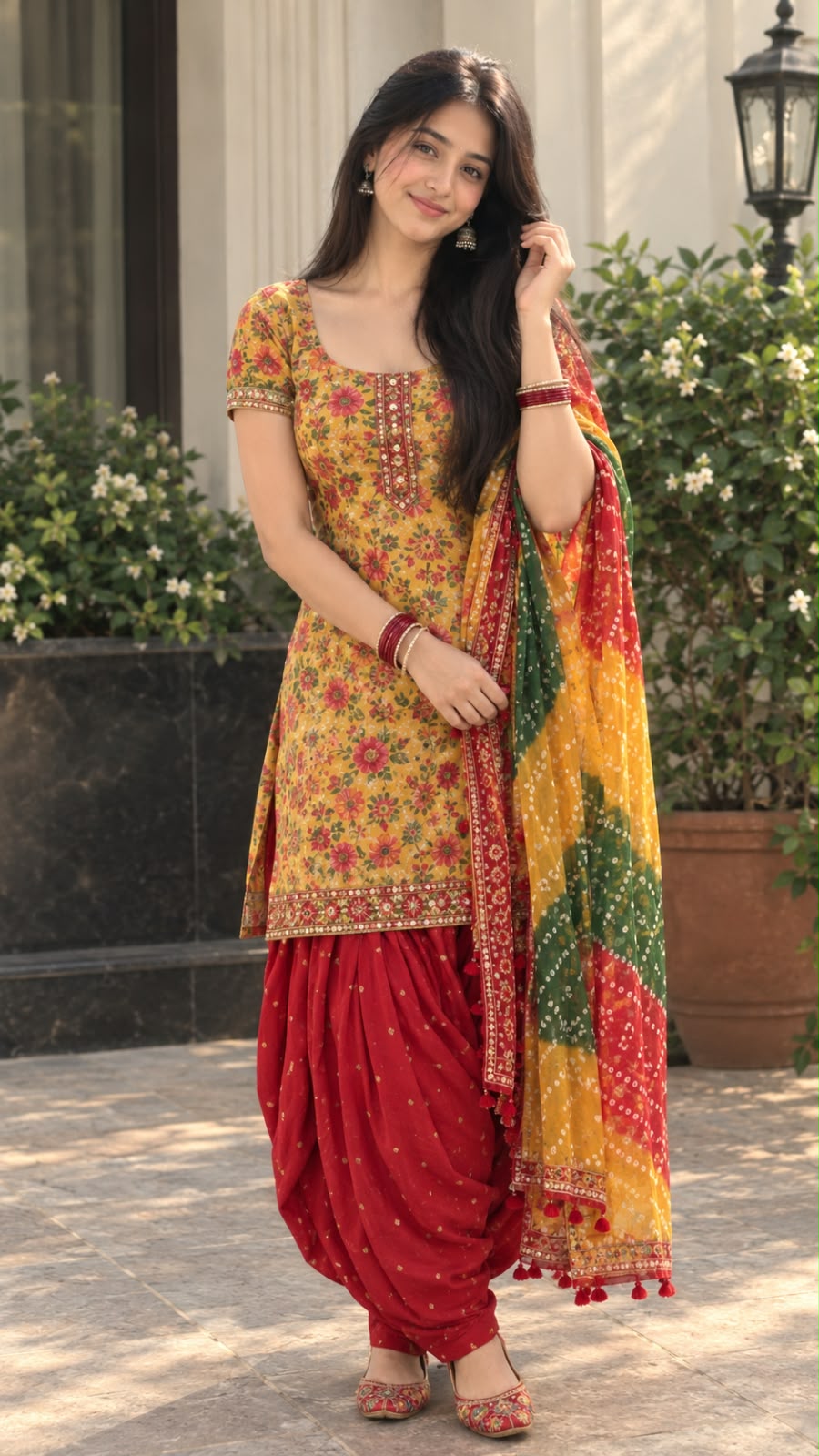
Image 1 is the outfit reference. Image 2 is the base photo. Recreate Image 2 exactly (same girl, same face, same long dark hair, same pose, same background, same camera angle, same lighting and same color grading), and change ONLY the outfit to the outfit from Image 1. Vertical 9:16 (1080x1920), ultra-realistic, ultra-sharp 8K HD quality, high detail, stays crisp when zoomed in. SUBJECT: Same girl as Image 2. Long, straight, dark black hair with a center parting, falling over her shoulders, soft natural makeup, small bindi, a gentle smile, head slightly tilted. Keep her face exactly identical, do not beautify or alter it. Keep the silver jhumka earrings and the thin silver bracelet.
Image 1 is the outfit reference. Image 2 is the base photo. Recreate Image 2 exactly (same girl, same face, same long dark hair, same pose, same background, same camera angle, same lighting and same color grading), and change ONLY the outfit to the outfit from Image 1. Vertical 9:16 (1080x1920), ultra-realistic, ultra-sharp 8K HD quality, high detail, stays crisp when zoomed in.
SUBJECT: Same girl as Image 2. Long, straight, dark black hair with a center parting, falling over her shoulders, soft natural makeup, small bindi, a gentle smile, head slightly tilted. Keep her face exactly identical, do not beautify or alter it. Keep the silver jhumka earrings and the thin silver bracelet.
POSE: Same as Image 2. She stands full-body, body slightly angled, her right hand raised and touching her hair near the ear, and her left hand resting gently at her waist, holding the edge of the dupatta. Relaxed, graceful, candid posture.
NEW OUTFIT (from Image 1):
- A short, knee-length, fitted kurti in mustard-yellow with a rich multicolor floral print in red, pink, green and orange, with a scoop neckline, short sleeves, a decorated front placket, and an embroidered border at the hem and sleeve edges.
- Bright red patiala salwar with a gathered, draped fit, small golden dot prints, and a tapered ankle.
- A long chiffon dupatta in a bandhani-style tie-dye print with mustard-yellow, green and red blocks, a red embroidered border, and small red tassels at the ends. It is draped over her shoulders and flowing down on her left side, in the same folds and direction as the red dupatta in Image 2.
- Embroidered multicolor flat juttis with a red and gold pattern on the feet.
- A set of red and gold bangles on her wrists.
Match the fabric texture, colors, prints and embroidery exactly as in Image 1. The new outfit replaces the white anarkali and the red dupatta completely.
BACKGROUND: Same as Image 2. A luxurious outdoor entrance with a black marble base on the left, lush green plants with white flowers in terracotta pots, cream pillars, a vintage black lantern on the right, and a stone-tiled floor. Softly blurred with shallow depth of field.
LIGHTING AND COLOR: Same as Image 2. Soft, warm, natural daylight with gentle shadows. The same light direction and warmth fall on her face, the new outfit and the background. Same natural, vibrant color grading.
BLENDING: The new outfit fits her body naturally, with correct folds, shadows and fabric texture, no pasted look and no visible seam. Skin tone and lighting match across the face, neck, arms and hands.
NO: text, watermark, extra people, distortion, extra fingers, change of face or background.
✓
Prompt copied to clipboard!
AI Photograph Prompt Card
✦AI PHOTO PROMPT
Image 1 is the outfit reference. Image 2 is the base photo. Recreate Image 2 exactly (same girl, same face, same long dark hair, same pose, same background, same camera angle, same lighting and same color grading), and change ONLY the outfit to the outfit from Image 1. Vertical 9:16 (1080x1920), ultra-realistic, ultra-sharp 8K HD quality, high detail, stays crisp when zoomed in. SUBJECT: Same girl as Image 2. Long, straight, dark black hair with a center parting, falling over her shoulders, soft natural makeup, small bindi, a gentle smile, head slightly tilted. Keep her face exactly identical, do not beautify or alter it. Keep the silver jhumka earrings and the thin silver bracelet.
Image 1 is the outfit reference. Image 2 is the base photo. Recreate Image 2 exactly (same girl, same face, same long dark hair, same pose, same background, same camera angle, same lighting and same color grading), and change ONLY the outfit to the outfit from Image 1. Vertical 9:16 (1080x1920), ultra-realistic, ultra-sharp 8K HD quality, high detail, stays crisp when zoomed in.
SUBJECT: Same girl as Image 2. Long, straight, dark black hair with a center parting, falling over her shoulders, soft natural makeup, small bindi, a gentle smile, head slightly tilted. Keep her face exactly identical, do not beautify or alter it. Keep the silver jhumka earrings and the thin silver bracelet.
POSE: Same as Image 2. She stands full-body, body slightly angled, her right hand raised and touching her hair near the ear, and her left hand resting gently at her waist, holding the edge of the dupatta. Relaxed, graceful, candid posture.
NEW OUTFIT (from Image 1):
- A short, knee-length, fitted kurti in mustard-yellow with a rich multicolor floral print in red, pink, green and orange, with a scoop neckline, short sleeves, a decorated front placket, and an embroidered border at the hem and sleeve edges.
- Bright red patiala salwar with a gathered, draped fit, small golden dot prints, and a tapered ankle.
- A long chiffon dupatta in a bandhani-style tie-dye print with mustard-yellow, green and red blocks, a red embroidered border, and small red tassels at the ends. It is draped over her shoulders and flowing down on her left side, in the same folds and direction as the red dupatta in Image 2.
- Embroidered multicolor flat juttis with a red and gold pattern on the feet.
- A set of red and gold bangles on her wrists.
Match the fabric texture, colors, prints and embroidery exactly as in Image 1. The new outfit replaces the white anarkali and the red dupatta completely.
BACKGROUND: Same as Image 2. A luxurious outdoor entrance with a black marble base on the left, lush green plants with white flowers in terracotta pots, cream pillars, a vintage black lantern on the right, and a stone-tiled floor. Softly blurred with shallow depth of field.
LIGHTING AND COLOR: Same as Image 2. Soft, warm, natural daylight with gentle shadows. The same light direction and warmth fall on her face, the new outfit and the background. Same natural, vibrant color grading.
BLENDING: The new outfit fits her body naturally, with correct folds, shadows and fabric texture, no pasted look and no visible seam. Skin tone and lighting match across the face, neck, arms and hands.
NO: text, watermark, extra people, distortion, extra fingers, change of face or background.
✓
Prompt copied to clipboard!
AI Photograph Prompt Card
✦AI PHOTO PROMPT
Image 1 is the reference photo. Image 2 is the outfit reference. Recreate Image 1 exactly (same 3D animated character, same face, same hair, same pose, same background, same camera angle, same lighting and same color grading), and change ONLY the outfit to the outfit from Image 2. Vertical 9:16 (1080x1920), ultra-sharp 8K HD quality, high detail, stays crisp when zoomed in. STYLE: Same polished 3D animated, Pixar-like character style as Image 1, with smooth skin, big expressive eyes and soft realistic shading. Do not change the art style.
Image 1 is the reference photo. Image 2 is the outfit reference. Recreate Image 1 exactly (same 3D animated character, same face, same hair, same pose, same background, same camera angle, same lighting and same color grading), and change ONLY the outfit to the outfit from Image 2. Vertical 9:16 (1080x1920), ultra-sharp 8K HD quality, high detail, stays crisp when zoomed in.
STYLE: Same polished 3D animated, Pixar-like character style as Image 1, with smooth skin, big expressive eyes and soft realistic shading. Do not change the art style.
CHARACTER: Same girl as Image 1. Long, wavy, dark brown hair falling over her shoulders, big dark brown eyes, rosy cheeks, soft shy smile, head tilted slightly to the side.
POSE: Same as Image 1. She stands full-body with her body slightly angled, head tilted, and both hands gently clasped in front of her at waist level. Her legs are crossed at the ankles, with a cute, shy, graceful posture.
NEW OUTFIT (from Image 2):
- A white blouse with a square neckline, a gathered ruffle at the neckline, and long puffed sleeves with frilled cuffs.
- Over it, a black velvet corset-style vest with wide shoulder straps and front lace-up eyelets with a black ribbon tie.
- A long, bright red tiered maxi skirt with a flowing, flared, gathered fit, falling to the ankles.
- A black structured shoulder handbag with a gold buckle, hanging naturally from her forearm, without changing her clasped-hands pose.
- Black leather Mary Jane flat shoes with a front strap, visible at the feet.
Match the fabric texture, colors and details exactly as in Image 2. The red skirt flows naturally in the same folds and the same direction as the denim skirt in Image 1.
BACKGROUND: Same as Image 1. A warm cream-beige wall with a wooden door with frosted glass panes on the left, stone steps, a large cream planter with white flowers and green climbing plants on the right, and a light beige tiled courtyard floor with dappled sunlight patches.
LIGHTING AND COLOR: Same as Image 1. Warm golden-hour sunlight with soft shadows from the leaves falling on the wall and the floor. The same light direction and warmth on the character, the new outfit and the background. Same warm, vibrant color grading.
BLENDING: The new outfit fits the body naturally, with correct folds, shadows and fabric texture, no pasted look and no visible seam. Skin tone and lighting match across the face, neck, arms and hands.
NO: black camera bar or phone UI at the top, grey side border, text, watermark, extra people, distortion, extra fingers.
✓
Prompt copied to clipboard!
AI Photograph Prompt Card
✦AI PHOTO PROMPT
Image 1 is the reference photo. Image 2 is the outfit reference. Recreate Image 1 exactly (same 3D animated character, same face, same hair, same pose, same background, same camera angle, same lighting and same color grading), and change ONLY the outfit to the outfit from Image 2. Vertical 9:16 (1080x1920), ultra-sharp 8K HD quality, high detail, stays crisp when zoomed in. STYLE: Same polished 3D animated, Pixar-like character style as Image 1, with smooth skin, big expressive eyes and soft realistic shading. Do not change the art style.
Image 1 is the reference photo. Image 2 is the outfit reference. Recreate Image 1 exactly (same 3D animated character, same face, same hair, same pose, same background, same camera angle, same lighting and same color grading), and change ONLY the outfit to the outfit from Image 2. Vertical 9:16 (1080x1920), ultra-sharp 8K HD quality, high detail, stays crisp when zoomed in.
STYLE: Same polished 3D animated, Pixar-like character style as Image 1, with smooth skin, big expressive eyes and soft realistic shading. Do not change the art style.
CHARACTER: Same girl as Image 1. Long, wavy, dark brown hair falling over her shoulders, big dark brown eyes, rosy cheeks, soft shy smile, head tilted slightly to the side.
POSE: Same as Image 1. She stands full-body with her body slightly angled, head tilted, and both hands gently clasped in front of her at waist level. Her legs are crossed at the ankles, with a cute, shy, graceful posture.
NEW OUTFIT (from Image 2):
- A white blouse with a square neckline, a gathered ruffle at the neckline, and long puffed sleeves with frilled cuffs.
- Over it, a black velvet corset-style vest with wide shoulder straps and front lace-up eyelets with a black ribbon tie.
- A long, bright red tiered maxi skirt with a flowing, flared, gathered fit, falling to the ankles.
- A black structured shoulder handbag with a gold buckle, hanging naturally from her forearm, without changing her clasped-hands pose.
- Black leather Mary Jane flat shoes with a front strap, visible at the feet.
Match the fabric texture, colors and details exactly as in Image 2. The red skirt flows naturally in the same folds and the same direction as the denim skirt in Image 1.
BACKGROUND: Same as Image 1. A warm cream-beige wall with a wooden door with frosted glass panes on the left, stone steps, a large cream planter with white flowers and green climbing plants on the right, and a light beige tiled courtyard floor with dappled sunlight patches.
LIGHTING AND COLOR: Same as Image 1. Warm golden-hour sunlight with soft shadows from the leaves falling on the wall and the floor. The same light direction and warmth on the character, the new outfit and the background. Same warm, vibrant color grading.
BLENDING: The new outfit fits the body naturally, with correct folds, shadows and fabric texture, no pasted look and no visible seam. Skin tone and lighting match across the face, neck, arms and hands.
NO: black camera bar or phone UI at the top, grey side border, text, watermark, extra people, distortion, extra fingers.
ChatGPT Se 3D Animated Girl Outfit Change Photo Kaise Banaye
Agar aap apni 3D animated girl ki photo mein sirf outfit change karna chahte hain aur face, pose aur background same rakhna chahte hain, toh ye steps follow karein.
Step 1: ChatGPT Open Karein
Apne mobile ya computer par ChatGPT open karein. Check karein ki aapke interface mein image generation ya image editing feature available hai.
Step 2: Dono Reference Images Upload Karein
Image 1 mein original 3D animated girl ki photo upload karein. Image 2 mein woh outfit reference upload karein jiske kapde aap character ko pehnana chahte hain.
Image 1 character, pose aur background ke liye reference hogi. Image 2 sirf naye outfit ke design ke liye use hogi.
Step 3: Complete Prompt Copy Karein
NoorEditing07.com par diye gaye complete 3D Animated Girl Outfit Change Prompt ko copy karein. Ismein white ruffle blouse, black corset vest, red tiered maxi skirt, black handbag aur Mary Jane shoes ki details shamil hain.
Step 4: Prompt Paste Karein
ChatGPT mein dono images ke saath prompt paste karein. Clearly mention karein ki Image 1 ki original character, hairstyle, facial features, pose, background aur lighting preserve karni hai aur sirf outfit change karna hai.
Step 5: Photo Generate Karein
Prompt submit karein aur image editing process complete hone dein. Tool ko original image ke composition ko follow karne aur outfit reference ke clothing details ko apply karne ki instructions milengi.
Step 6: Generated Image Check Karein
Result mein face, hair, hands, pose aur background compare karein. Check karein ki red skirt ankle-length hai, black vest ka lace-up design sahi hai aur white blouse ke ruffle aur puffed sleeves clearly dikh rahe hain.
Handbag, gold buckle aur black Mary Jane shoes ko bhi check karein.
Step 7: Zaroori Corrections Karein
Agar AI ne background badal diya hai ya character ka face alag kar diya hai, toh follow-up instruction mein sirf us issue ko correct karne ke liye kahein.
Agar outfit ke folds ya accessories galat hain, toh un details ko separately refine karein. Har generation mein perfect result milna guaranteed nahi hota.
Step 8: Final Image Save Karein
Jab image aapki requirements ke kareeb ho, toh use save karein. Agar vertical 9:16 ratio ya 1080 × 1920 resolution available nahi hai, toh suitable image editor se crop ya resize kar sakte hain.
Pro Tip: Clear reference images use karein aur prompt mein dono images ka role alag-alag explain karein. Isse AI ko samajhne mein madad milti hai ki original character ko preserve karna hai aur sirf kapdon ko reference outfit ke according edit karna hai.
3D Animated Girl Outfit Change Prompt - Noor Editing
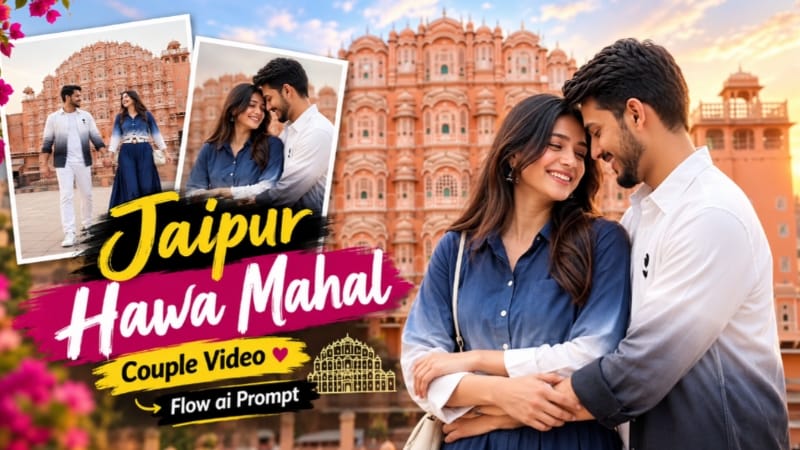
1. Jaipur Hawa Mahal Couple Video Edit | Flow AI Prompt – Romantic Travel Reel
Jaipur Hawa Mahal Couple Video Edit ek romantic cinematic travel-reel concept hai. Ismein Pink City ki sandstone architecture, Hawa Mahal, carved archways aur couple ke natural romantic moments ko 10-second landscape video mein dikhaya gaya hai. Prompt mein total 9 cinematic shots aur 16:9 composition use ki gayi hai. Original Article
Step 1: Character Reference Photos Banayein
Male aur female characters ki clear reference photos ready karein. Image 1 male aur Image 2 female character ke liye use hoti hai.
Step 2: Flow AI Open Karein
Flow AI ka available video-generation workflow open karein. Agar multiple reference images ka option available hai, to dono photos upload karein.
Step 3: Complete Prompt Copy Karein
NoorEditing07.com se Jaipur Hawa Mahal Couple Video Prompt copy karein. Ismein outfits, locations, camera angles aur identity consistency ki instructions hain.
Step 4: Prompt Paste Karein
Copied prompt paste karein. Available settings mein 16:9 landscape format aur 10-second target duration select karein.
Faces, outfits, movements aur Jaipur architecture check karein. Prompt mein bottom-centre white NoorEditing07 watermark ki instruction bhi hai.
Step 7: Final Video Export Karein
Agar koi shot ya watermark sahi nahi hai, to clips separately generate karke editor mein combine karein. Final preview ke baad video export karein.
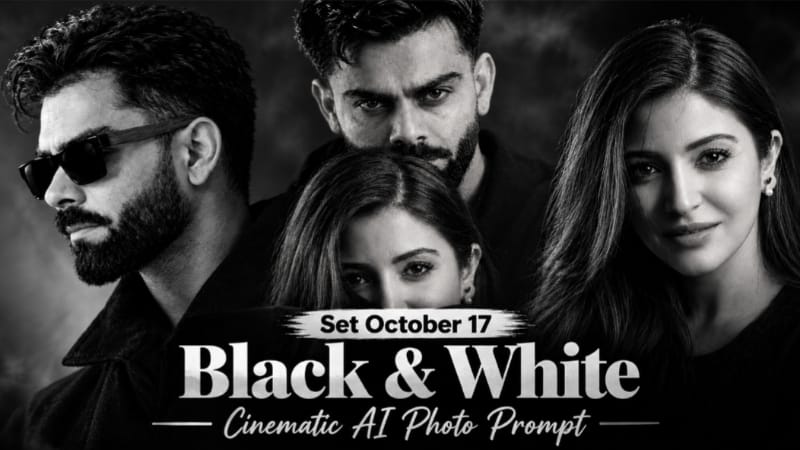
2. Black and White Cinematic AI Photo Editing Prompt with Face Reference
Black and White Cinematic AI Photo Editing Prompt se aap apni reference photo ko dramatic monochrome portrait style mein transform kar sakte hain. Is concept mein deep blacks, strong shadows, yellow sunglasses aur lock-screen style date-clock overlay ka look use hota hai. Original Article
Step 1: Reference Photos Select Karein
Image 1 ko pose, outfit, sunglasses aur composition reference ke liye rakhein. Image 2 mein apni clear face photo use karein.
Step 2: ChatGPT Open Karein
ChatGPT ka image-generation feature open karein aur dono reference photos upload karein.
Step 3: Prompt Copy Karein
NoorEditing07.com se complete Black and White Cinematic AI Photo Prompt copy karein. Prompt mein original face preserve karne aur monochrome effect maintain karne ki instructions check karein.
Step 4: Prompt Paste Karein
Prompt paste karein aur image generate karein. Vertical 9:16 format aur 1080 × 1920 resolution target rakhein, agar available ho.
Step 5: Black and White Effect Check Karein
Photo mein deep blacks, detailed shadows aur natural facial texture check karein. Yellow sunglasses ko prompt ke according maintain karein.
Step 6: Date Aur Clock Verify Karein
Agar image mein lock-screen style date aur clock text hai, to uski spelling aur placement check karein. AI-generated text mein errors aa sakte hain.
Step 7: Final Image Save Karein
Face, hairstyle, outfit aur composition satisfactory hone par image save karein. Zarurat par text aur cropping ko image editor mein correct karein.
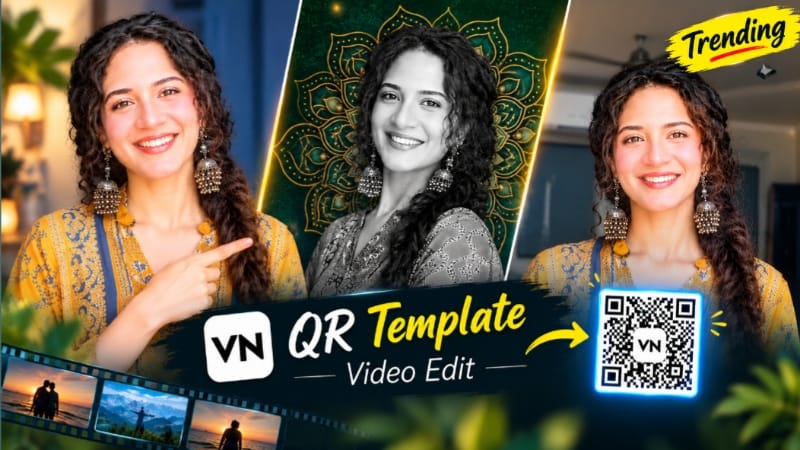
3. VN QR Code Template | Trending VN Video Editing Template
VN QR Code Template ek useful editing method hai jisse compatible VN template ko open karke apni photos aur video clips ke saath edit banaya ja sakta hai. Template ke transitions, timing aur visual effects selected project par depend karte hain. Original Article
Step 1: VN App Install Karein
Apne mobile mein VN Video Editor install karein aur app open karein.
Step 2: QR Code Save Karein
NoorEditing07.com par VN QR Code Template article open karein. Page par available QR code ki clear image Gallery mein save karein.
Step 3: VN Mein Scan Option Open Karein
VN app ki home screen par Scan option dekhein. Gallery se QR image select karein, agar aapke app version mein ye feature available ho.
Step 4: Template Open Karein
QR code successfully open hone par template preview check karein. Download ya Use Template ka option aaye, to usse select karein.
Step 5: Apni Photos Add Karein
Template ke media slots mein apni photos ya video clips select karein. Required order, cropping aur clip placement ko carefully check karein.
Step 6: Video Preview Karein
Video ko start se end tak play karein. Transitions, timing aur text placement mein koi issue ho to available editing tools se correct karein.
Step 7: Export Aur Share Karein
Suitable resolution select karke final video export karein. Aap ise Instagram Reels, YouTube Shorts ya WhatsApp Status par share kar sakte hain.
Note: QR scanning aur template options VN app version ke according different ho sakte hain.
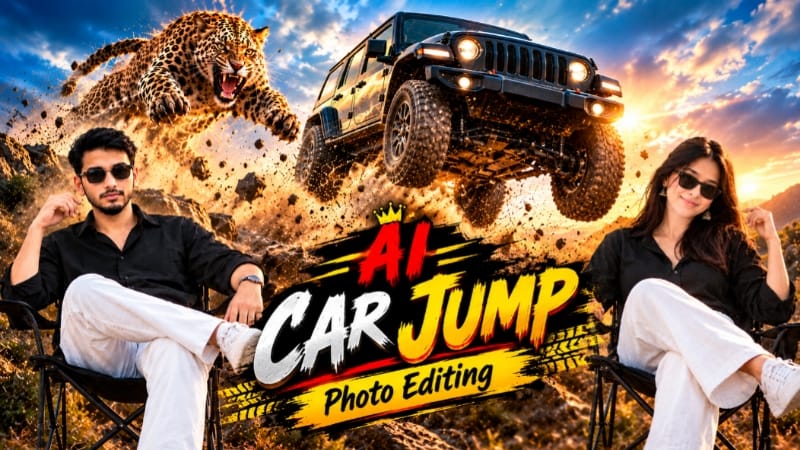
4. Car Jump / Chita Jump AI Photo Editing | ChatGPT Prompt
Car Jump AI Photo Editing ek cinematic automotive portrait concept hai. Ismein person ko black folding camping chair par confidently baithe hue dikhaya jata hai, jabki background mein ek large vehicle airborne jump karta hai. Golden field, sunset sky, flying dust aur dramatic low-angle composition is image ko action-advertising style dete hain. Article mein leopard ke airborne leap wala alternate concept bhi diya gaya hai. Original Article
Step 1: Reference Photo Upload Karein
Apni clear photo select karein, jisme face, hairstyle aur natural body proportions visible hon. Isi photo ko person ki identity reference ke roop mein use karein.
Step 2: ChatGPT Open Karein
ChatGPT ka image-generation feature open karein aur reference photo upload karein.
Step 3: Vehicle Choose Karein
Prompt mein [VEHICLE BRAND / MODEL / COLOR] ki jagah apni pasand ki vehicle details enter karein. Vehicle ke body shape, grille, headlights aur wheels ko accurate rakhne ki instructions dein.
Step 4: AI Prompt Copy Karein
NoorEditing07.com se Car Jump AI Photo Prompt copy karein. Ismein black folding chair, golden grassland, sunset lighting aur airborne vehicle ki details shamil hain.
Step 5: Prompt Paste Karein
Prompt paste karke vertical 4:5 portrait format select karein, agar available ho.
Step 6: Image Generate Karein
Person ko chair par seated pose mein aur vehicle ko upper background mein airborne position mein generate karein. Flying dust face ko cover nahi karna chahiye.
Step 7: Final Result Check Karein
Face, hands, chair, vehicle design aur shadows inspect karein. Agar aap leopard version bana rahe hain, to uske reference image aur markings ko separately specify karein.
Step 8: Save Karein
Result satisfactory hone par image save karein. Ye fictional AI artwork hai—real vehicle jump ya wildlife stunt ko recreate karne ki koshish na karein.
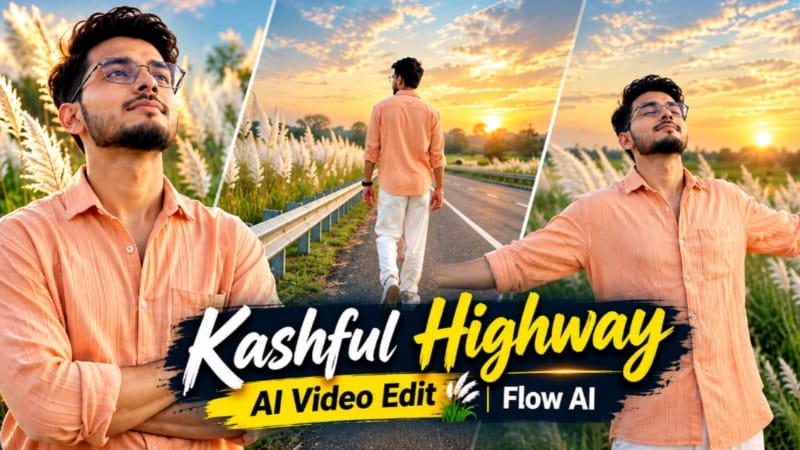
5. Kashful Highway Cinematic AI Video | Flow AI Prompt
Kashful Highway Cinematic AI Video ek emotional photo-to-video concept hai. Ismein rural highway, tall white Kashful grass, metal roadside railing aur soft indigo-amber sunset lighting ka use hota hai. Prompt mein 6 cinematic scenes aur 16:9 widescreen composition di gayi hai. Original Article
Step 1: Reference Photo Ready Karein
Apni clear photo select karein, jisme face aur hairstyle clearly visible hon. Isse character ki appearance consistent rakhne mein madad mil sakti hai.
Step 2: Flow AI Open Karein
Flow AI mein available video-generation feature open karein aur reference image upload karein, agar workflow support karta ho.
Step 3: Prompt Copy Karein
NoorEditing07.com se Kashful Highway Cinematic AI Video Prompt copy karein. Ismein outfit, lighting, six-scene sequence aur watermark instructions shamil hain.
Step 4: Prompt Paste Karein
Prompt paste karke 16:9 landscape format select karein, agar available ho.
Step 5: Outfit Maintain Karein
Character ke outfit mein peach-orange button-down shirt, loose white trousers aur white casual sneakers hain.
Step 6: Six Scenes Generate Karein
Sequence mein roadside railing ke paas back-view walking, arms-crossed pose, highway ke paas side profile, road par arms spread karke walking, sky ki taraf dekhna aur distant horizon ki taraf running shamil hain.
Step 7: Lighting Aur Identity Check Karein
Har scene mein face, outfit aur sunset lighting ki consistency inspect karein. Background mein white Kashful grass aur empty highway ka cinematic look maintain karein.
Step 8: Watermark Add Karein
Prompt mein bottom-corner NoorEditing07 watermark ki instruction hai. Agar AI text sahi render na kare, to video editor mein add karein.
Step 9: Final Video Export Karein
Zarurat par scenes ko separate clips mein generate karke correct order mein arrange karein. Final preview ke baad video export karein.