Fan Blade Outfit Change AI Video is a creative cinematic fashion transition concept designed for generating a stylish vertical video with multiple outfit changes. The main visual effect of this concept is created using a ceiling fan blade as an in-camera wipe transition. Every time the dark fan blade passes across the camera lens, the outfit changes instantly into a new fashion look.
The video is designed in a 9:16 vertical format with an 8K cinematic appearance. The entire sequence is filmed from a high-angle top-down overhead perspective, giving viewers a unique view of the subject lying gracefully on a textured designer carpet. This camera perspective also makes the fan blade transition especially effective because the blade moves directly across the foreground of the lens.
The prompt places strong importance on facial identity and realism. The uploaded female reference photo is used as the strict identity reference across all five scenes. Facial features, natural eye shape, lips and realistic skin texture are intended to remain consistent throughout the complete video. This identity consistency helps the different fashion looks feel like part of one continuous fashion transformation rather than separate AI-generated characters.
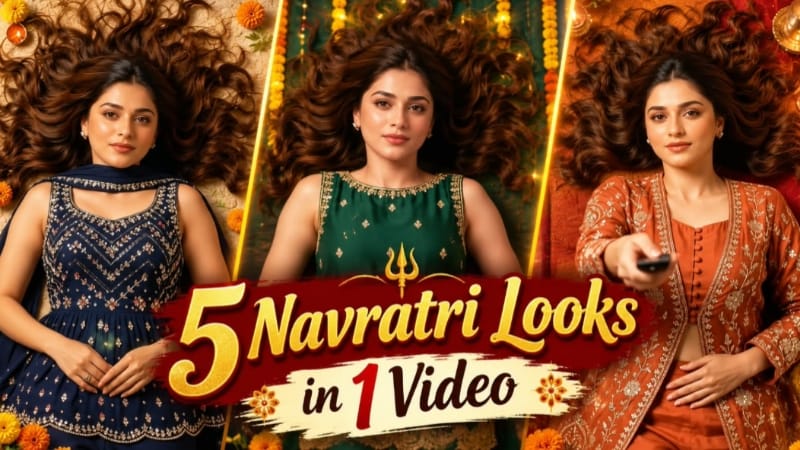
The visual concept begins with a beautiful woman lying gracefully on a textured designer carpet. Her long wavy dark hair is spread naturally around her, and she looks upward toward the ceiling fan with a poised expression. She holds a black remote in her hand and points it upward toward the fan.
The first scene features a rust-orange embroidered long jacket paired with matching silk sharara pants. The warm fabric tones and detailed embroidery establish the luxurious fashion theme from the beginning. The woman clicks the remote, creating the starting point for the upcoming outfit transitions.
The first major transition happens when a dark ceiling fan blade smoothly sweeps across the camera lens. The passing blade works as an in-camera wipe, and when it clears the frame, the outfit has changed into an emerald-green sleeveless short kurti. The look includes a heavy gold pearl-scalloped border and matching green trousers, creating a rich traditional fashion appearance.
The second fan blade creates the next transition. As the blade passes over the lens, the emerald-green outfit seamlessly transforms into a royal navy-blue peplum top decorated with multicolored crystals. The look is completed with flared navy pants and a long cape dupatta. This scene adds a more glamorous and contemporary fashion style to the sequence.
The third fan blade produces another instant outfit change. This time, the navy-blue fashion look transforms into a jet-black sleeveless tunic featuring heavy silver crystal chevron patterns. A sheer black dupatta completes the outfit. The combination of black fabric and silver detailing creates a strong luxury fashion appearance.
The final transition occurs when the fourth fan blade passes smoothly across the lens. After the blade clears the frame, the outfit changes into a heavy pastel blush-pink bridal velvet anarkali. Fine rose-gold zardozi work and matching gold bangles complete the final bridal-inspired look. This final outfit provides a soft and elegant ending to the fashion transformation sequence.
The use of a single overhead camera perspective throughout the concept helps maintain visual consistency. Instead of using complicated camera movements, the main attention remains on the subject, the fan blade and the outfit transformation. The fan blade becomes an important part of the storytelling and acts as a natural transition element.
The lighting is designed around warm ambient luxury indoor lighting with a calibrated DSLR film grade. Rich fabric tones help the different outfits stand out clearly while maintaining a premium cinematic appearance. The prompt also focuses on avoiding facial deformation and unnatural AI morphing so that the subject remains visually consistent between transitions.
The 9:16 vertical aspect ratio makes this concept suitable for short-form video platforms such as Instagram Reels and YouTube Shorts. The fast outfit transformations can also make the video visually engaging because viewers can easily follow the progression from one fashion look to another.
A clean semi-transparent white NoorEditing07 watermark is permanently fixed in the bottom corner for branding. Overall, this Fan Blade Outfit Change AI Video Prompt combines fashion styling, overhead cinematography and creative in-camera transitions to create a visually distinctive AI fashion video.
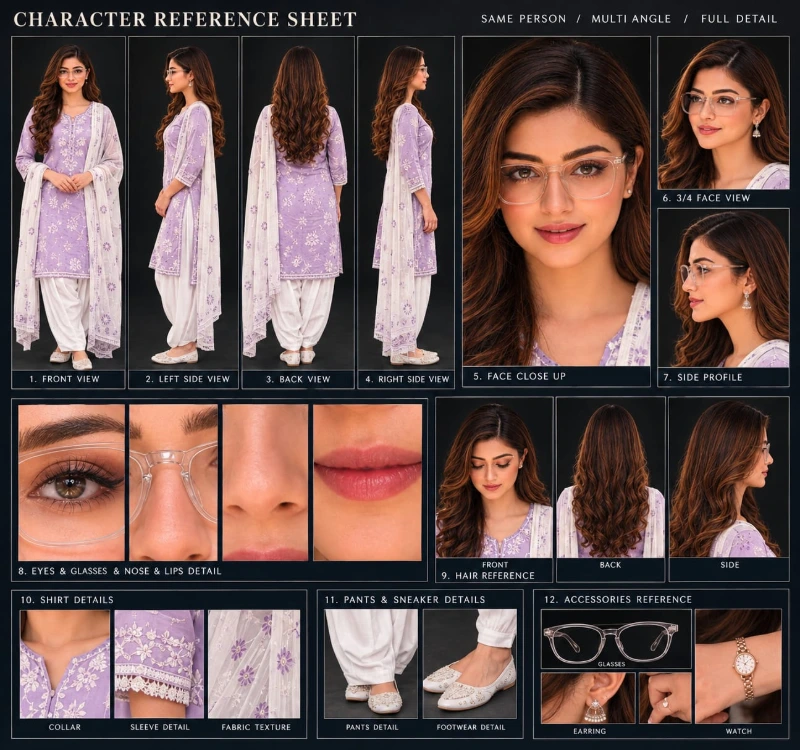
Sabse Pehle Character Sheet Photo Banaai ChatGPT Se
A premium, professional, ultra-photorealistic full-body character reference sheet for the person identified in the uploaded photo. The sheet is presented in a clean professional studio environment with a dark, luxury background. The character's identity, facial features, skin tone, body proportions, hairstyle, and transparent-frame glasses are perfectly consistent with the reference photo. The character is wearing the exact outfit from the reference: a mustard-yellow polo shirt with white piping, black slim-fit pants, and white sneakers. The layout is an elegant grid containing: 1. Full-body front view, 2. Full-body left side view, 3. Full-body back view, 4. Full-body right side view. 5. Large face close-up, 6. 3/4 face view, 7. Side-profile face view. 8. Detailed eye, glasses, nose, and lips reference crops. 9. Hair front, back, and side reference. 10. Shirt collar, sleeve, and fabric texture details. 11. Pants and sneaker detail shots. 12. Accessories reference. All views depict the same person with high-end cinematic lighting, extremely sharp facial details, realistic skin texture, natural hair strands, realistic fabric texture, accurate clothing stitching, and physically accurate lighting with subtle shadows. The full body is completely visible in all turnaround views, including both shoes. The presentation features sophisticated typography, thin clean borders, and balanced spacing. No watermarks, cartoons, or distortions are present.
A premium, professional, ultra-photorealistic full-body character reference sheet for the person identified in the uploaded photo. The sheet is presented in a clean professional studio environment with a dark, luxury background. The character's identity, facial features, skin tone, body proportions, hairstyle, and transparent-frame glasses are perfectly consistent with the reference photo. The character is wearing the exact outfit from the reference: a mustard-yellow polo shirt with white piping, black slim-fit pants, and white sneakers. The layout is an elegant grid containing: 1. Full-body front view, 2. Full-body left side view, 3. Full-body back view, 4. Full-body right side view. 5. Large face close-up, 6. 3/4 face view, 7. Side-profile face view. 8. Detailed eye, glasses, nose, and lips reference crops. 9. Hair front, back, and side reference. 10. Shirt collar, sleeve, and fabric texture details. 11. Pants and sneaker detail shots. 12. Accessories reference. All views depict the same person with high-end cinematic lighting, extremely sharp facial details, realistic skin texture, natural hair strands, realistic fabric texture, accurate clothing stitching, and physically accurate lighting with subtle shadows. The full body is completely visible in all turnaround views, including both shoes. The presentation features sophisticated typography, thin clean borders, and balanced spacing. No watermarks, cartoons, or distortions are present.
✓
Prompt copied to clipboard!
AI Video Prompt
✦AI PHOTO PROMPT
A premium, professional, ultra-photorealistic full-body character reference sheet for the person identified in the uploaded photo. The sheet is presented in a clean professional studio environment with a dark, luxury background. The character's identity, facial features, skin tone, body proportions, hairstyle, and transparent-frame glasses are perfectly consistent with the reference photo. The character is wearing the exact outfit from the reference: a mustard-yellow polo shirt with white piping, black slim-fit pants, and white sneakers. The layout is an elegant grid containing: 1. Full-body front view, 2. Full-body left side view, 3. Full-body back view, 4. Full-body right side view. 5. Large face close-up, 6. 3/4 face view, 7. Side-profile face view. 8. Detailed eye, glasses, nose, and lips reference crops. 9. Hair front, back, and side reference. 10. Shirt collar, sleeve, and fabric texture details. 11. Pants and sneaker detail shots. 12. Accessories reference. All views depict the same person with high-end cinematic lighting, extremely sharp facial details, realistic skin texture, natural hair strands, realistic fabric texture, accurate clothing stitching, and physically accurate lighting with subtle shadows. The full body is completely visible in all turnaround views, including both shoes. The presentation features sophisticated typography, thin clean borders, and balanced spacing. No watermarks, cartoons, or distortions are present.
A premium, professional, ultra-photorealistic full-body character reference sheet for the person identified in the uploaded photo. The sheet is presented in a clean professional studio environment with a dark, luxury background. The character's identity, facial features, skin tone, body proportions, hairstyle, and transparent-frame glasses are perfectly consistent with the reference photo. The character is wearing the exact outfit from the reference: a mustard-yellow polo shirt with white piping, black slim-fit pants, and white sneakers. The layout is an elegant grid containing: 1. Full-body front view, 2. Full-body left side view, 3. Full-body back view, 4. Full-body right side view. 5. Large face close-up, 6. 3/4 face view, 7. Side-profile face view. 8. Detailed eye, glasses, nose, and lips reference crops. 9. Hair front, back, and side reference. 10. Shirt collar, sleeve, and fabric texture details. 11. Pants and sneaker detail shots. 12. Accessories reference. All views depict the same person with high-end cinematic lighting, extremely sharp facial details, realistic skin texture, natural hair strands, realistic fabric texture, accurate clothing stitching, and physically accurate lighting with subtle shadows. The full body is completely visible in all turnaround views, including both shoes. The presentation features sophisticated typography, thin clean borders, and balanced spacing. No watermarks, cartoons, or distortions are present.
Cinematic 9:16 vertical 8K fashion transition video shot directly from a high-angle top-down overhead perspective. [IDENTITY & FACE LOCK] Strictly preserve 100% facial features, identity, natural eye shape, lips, and realistic skin texture from the uploaded female reference photo across all 5 scenes. Skin must be ultra-clean, smooth, pore-detailed, completely blemish-free with zero acne or spots, avoiding any AI-morphing or unnatural airbrushing.
Cinematic 9:16 vertical 8K fashion transition video shot directly from a high-angle top-down overhead perspective.
[IDENTITY & FACE LOCK]
Strictly preserve 100% facial features, identity, natural eye shape, lips, and realistic skin texture from the uploaded female reference photo across all 5 scenes. Skin must be ultra-clean, smooth, pore-detailed, completely blemish-free with zero acne or spots, avoiding any AI-morphing or unnatural airbrushing.
[POSE & SETTING]
A beautiful young woman lies gracefully on a textured designer carpet with long wavy dark hair spread out, looking directly up toward the ceiling fan with a poised expression. Each time a dark ceiling fan blade sweeps across the foreground of the lens, it acts as an in-camera wipe transition that instantly swaps the outfit.
[5 EXACT SCENE TRANSITIONS]
- Scene 1: She lies on the carpet holding a black remote in hand, aims it up, and clicks the button. Wearing a rust-orange embroidered long jacket over matching silk sharara pants.
- Scene 2: The first fan blade sweeps smoothly across the camera lens. Behind the passing blade, her outfit instantly changes to an emerald-green sleeveless short kurti with heavy gold pearl-scalloped border and matching green trousers.
- Scene 3: The second fan blade sweeps across the frame. Outfit seamlessly transforms into a royal navy-blue peplum top studded with multicolored crystals, paired with flared navy pants and long cape dupatta.
- Scene 4: The third fan blade sweeps across the frame. Outfit instantly wipes into a jet-black sleeveless tunic adorned with heavy silver crystal chevron patterns and sheer black dupatta.
- Scene 5: A fourth fan blade passes smoothly across the lens. Outfit switches into a heavy pastel blush-pink bridal velvet anarkali with fine rose-gold zardozi work and matching gold bangles.
[LIGHTING & SPECS]
Warm ambient luxury indoor lighting, calibrated DSLR film grade, vibrant rich fabric tones, zero facial deformation, 9:16 vertical aspect ratio. Clean semi-transparent white watermark 'NoorEditing07' permanently fixed in the bottom corner.
✓
Prompt copied to clipboard!
AI Video Prompt Card
✦AI VIDEO PROMPT
Cinematic 9:16 vertical 8K fashion transition video shot directly from a high-angle top-down overhead perspective. [IDENTITY & FACE LOCK] Strictly preserve 100% facial features, identity, natural eye shape, lips, and realistic skin texture from the uploaded female reference photo across all 5 scenes. Skin must be ultra-clean, smooth, pore-detailed, completely blemish-free with zero acne or spots, avoiding any AI-morphing or unnatural airbrushing.
Cinematic 9:16 vertical 8K fashion transition video shot directly from a high-angle top-down overhead perspective.
[IDENTITY & FACE LOCK]
Strictly preserve 100% facial features, identity, natural eye shape, lips, and realistic skin texture from the uploaded female reference photo across all 5 scenes. Skin must be ultra-clean, smooth, pore-detailed, completely blemish-free with zero acne or spots, avoiding any AI-morphing or unnatural airbrushing.
[POSE & SETTING]
A beautiful young woman lies gracefully on a textured designer carpet with long wavy dark hair spread out, looking directly up toward the ceiling fan with a poised expression. Each time a dark ceiling fan blade sweeps across the foreground of the lens, it acts as an in-camera wipe transition that instantly swaps the outfit.
[5 EXACT SCENE TRANSITIONS]
- Scene 1: She lies on the carpet holding a black remote in hand, aims it up, and clicks the button. Wearing a rust-orange embroidered long jacket over matching silk sharara pants.
- Scene 2: The first fan blade sweeps smoothly across the camera lens. Behind the passing blade, her outfit instantly changes to an emerald-green sleeveless short kurti with heavy gold pearl-scalloped border and matching green trousers.
- Scene 3: The second fan blade sweeps across the frame. Outfit seamlessly transforms into a royal navy-blue peplum top studded with multicolored crystals, paired with flared navy pants and long cape dupatta.
- Scene 4: The third fan blade sweeps across the frame. Outfit instantly wipes into a jet-black sleeveless tunic adorned with heavy silver crystal chevron patterns and sheer black dupatta.
- Scene 5: A fourth fan blade passes smoothly across the lens. Outfit switches into a heavy pastel blush-pink bridal velvet anarkali with fine rose-gold zardozi work and matching gold bangles.
[LIGHTING & SPECS]
Warm ambient luxury indoor lighting, calibrated DSLR film grade, vibrant rich fabric tones, zero facial deformation, 9:16 vertical aspect ratio. Clean semi-transparent white watermark 'NoorEditing07' permanently fixed in the bottom corner.
Fan Blade Outfit Change AI Video banane ke liye sabse pehle ek clear female reference photo ready karein. Reference photo mein face clearly visible hona chahiye, kyunki isi image ko character identity consistency ke liye use kiya jayega.
Sabse pehle Flow AI open karein aur uploaded female reference photo ko add karein. Iske baad complete Fan Blade Outfit Change AI Video Prompt ko copy karke Flow AI mein paste karein.
Prompt mein identity lock ke liye facial features, natural eye shape, lips aur realistic skin texture ko reference photo ke according maintain karne ki instructions di gayi hain. Isliye clear reference image use karna important hai.
Video settings mein 9:16 vertical aspect ratio select karein. Prompt ke according video ko high-angle top-down overhead perspective mein generate karein. Is camera angle ko complete sequence mein consistent rakhna important hai, kyunki fan blade isi perspective se lens ke foreground mein move karega.
Pehle scene mein woman textured designer carpet par gracefully leti hui hogi. Uske long wavy dark hair carpet par naturally spread honge. Woh ceiling fan ki taraf dekhegi aur hand mein black remote lekar button click karegi. Is scene mein rust-orange embroidered long jacket aur matching silk sharara pants honge.
Button click ke baad pehla ceiling fan blade camera lens ke across smoothly pass hoga. Blade frame ko temporarily cover karega aur uske clear hone ke baad outfit emerald-green sleeveless short kurti aur matching green trousers mein change ho jayega.
Second fan blade ke pass hone par outfit royal navy-blue peplum top, flared navy pants aur long cape dupatta mein transform hoga. Peplum top par multicolored crystal detailing maintain karein.
Third fan blade ke through next transition create hoga. Is baar outfit jet-black sleeveless tunic mein change hoga, jisme silver crystal chevron patterns aur sheer black dupatta hoga.
Fourth fan blade final transition create karega. Blade ke pass hone ke baad outfit pastel blush-pink bridal velvet anarkali mein change hoga. Fine rose-gold zardozi work aur matching gold bangles final look ko complete karenge.
Video generate hone ke baad har transition ko carefully check karein. Fan blade ka movement smooth hona chahiye aur outfit change blade ke pass hone ke saath naturally hidden hona chahiye. Agar outfit transition blade clear hone se pehle visible ho raha hai, to prompt ko refine karke transition timing improve karein.
Face consistency bhi check karein. Har scene mein reference photo wali identity maintain honi chahiye. Facial deformation, unnatural morphing, inconsistent hair ya sudden appearance changes ko avoid karein.
Lighting warm luxury indoor style mein honi chahiye aur fabric colors rich aur detailed dikhne chahiye. Final video mein clean semi-transparent white NoorEditing07 watermark bottom corner mein permanently visible rakhein.
Is tarah aap Flow AI ki madad se ek creative 9:16 Fan Blade Outfit Change AI Video create kar sakte hain jisme ek hi video mein five different fashion looks aur four smooth fan-blade transitions milte hain.
Fan Blade Outfit Change AI VideoOutfit Change AI VideoFashion Transition AI VideoFan Blade TransitionFlow AI PromptFlow AI VideoAI Fashion VideoAI Outfit ChangeCinematic Fashion Video9:16 AI Video8K AI VideoFashion TransformationDress Change AI VideoAI Video From PhotoNoorEditing07
Fan Blade Outfit Change AI VideoOutfit Change AI VideoFashion Transition AI VideoFan Blade TransitionFlow AI PromptFlow AI VideoAI Fashion VideoAI Outfit ChangeCinematic Fashion Video9:16 AI Video8K AI VideoFashion TransformationDress Change AI VideoAI Video From PhotoNoorEditing07
Romantic Beach Couple, Sad Riverbank Love Story, Dark Jungle Fairy & Mountain AI Editing Tutorial
AI photo aur video editing ki help se normal reference photos ko cinematic beach couple videos, emotional riverbank stories, moonlight fantasy portraits aur mountain music videos mein transform kiya ja sakta hai. Is tutorial mein ChatGPT aur Flow AI ke through five creative editing concepts cover kiye gaye hain. Har workflow mein reference identity, environment, camera composition, lighting aur final output quality ko consistent rakhne par focus hai.
1. Romantic Beach Couple AI Video | Cinematic 9:16 Love Video | Flow AI Prompt
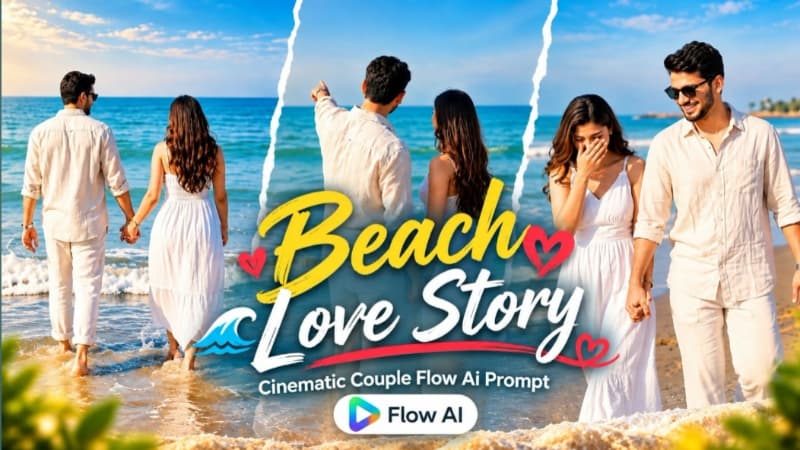
Romantic Beach Couple AI Video ek cinematic photo-to-video concept hai jisme male aur female ki separate reference photos ko use karke sandy beach par five connected scenes create kiye jaate hain. Sea waves, soft overcast daylight, gentle breeze aur flowing outfits video ko realistic cinematic atmosphere dete hain.
Video 9:16 vertical format aur 1080p resolution ke liye designed hai. Dono subjects ke facial features, hairstyles, outfits aur natural proportions ko reference photos ke according consistent rakhna is edit ka main focus hai. citeturn192469search2
Step-by-Step Workflow
1. Male aur female ki clear, high-quality reference photos ready karein.
2. Flow AI open karke new project create karein.
3. Dono photos ko separate reference images ke roop mein upload karein.
4. Romantic Beach Couple AI Video prompt copy karke prompt box mein paste karein.
5. Male aur female ki identities ko unki respective reference photos ke according consistent rakhein.
6. Woman ka white embroidered kurta with pink floral details, white dupatta aur matching accessories maintain karein.
7. Man ka white mandarin-collar shirt, light-blue denim jeans, white sneakers aur black watch consistent rakhein.
8. 9:16 vertical format aur 1080p setting available ho to select karein.
9. Scene 1: wide rear shot mein couple ko sea ki taraf walk karte hue aur hands naturally join karte hue show karein.
10. Scene 2: medium front shot mein woman ko camera ki taraf walk karte hue aur man ko slightly behind maintain karein.
11. Scene 3: man ka side-profile close-up aur background mein woman ka softly blurred appearance check karein.
12. Scene 4: couple ko beach ke paas face-to-face standing, gently holding hands aur joined hands ki taraf dekhte hue show karein.
13. Scene 5: man ka final close-up aur background mein woman ka softly out-of-focus appearance maintain karein.
14. Har scene mein sea, sandy beach, soft daylight aur gentle wind ko consistent rakhein.
16. Agar identity drift ya hand distortion ho, affected scene ko stronger reference instructions ke saath regenerate karein.
17. Final video ka preview check karein aur high-quality format mein export karein.
2. Sad Riverbank Love Story AI Video | Cinematic Couple Video | Flow AI Prompt
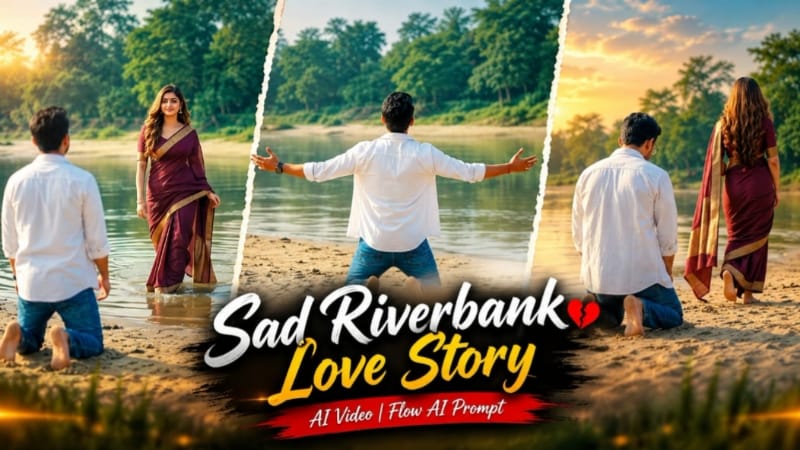
Sad Riverbank Love Story ek emotional cinematic video concept hai jisme sandy riverbank, calm water, green trees aur soft daylight ke saath connected storytelling create ki jati hai.
Is concept ka important moment tab aata hai jab man riverbank par kneel karke apne arms wide open karta hai. Uske arms fully open hone ke baad woman distant shallow water se enter karti hai. Is timing ko preserve karna story ke emotional flow aur scene continuity ke liye important hai.
Step-by-Step Workflow
1. Man aur woman ki clear reference photos ready karein.
2. Flow AI open karke image-to-video workflow select karein.
3. Dono reference images upload karein.
4. Sad Riverbank Love Story AI Video prompt paste karein.
5. Man ka open white shirt, white T-shirt aur blue jeans consistent rakhein.
6. Woman ka deep maroon saree with gold border aur open hairstyle throughout the video maintain karein.
7. Video ke liye 16:9 landscape format select karein.
8. Scene 1: wide rear shot mein man ko sandy riverbank par walk karte hue show karein.
9. Man ko kneel karne aur dono arms fully open karne ka action generate karein.
10. Arms fully open hone ke baad short delay maintain karke woman ko distant shallow water se enter karte hue show karein.
11. Scene 2: woman ka low-angle long shot aur riverbank par walking movement check karein.
12. Scene 3: man ka frontal medium walking shot aur subtle emotional expression verify karein.
13. Woman ke saree pallu aur hair movement ko natural wind ke saath consistent rakhein.
14. River water, sand, trees aur daylight ko connected scenes mein maintain karein.
15. Face identity, outfits, hands, kneeling movement aur walking physics check karein.
16. Agar woman galat time par enter kare ya character identity change ho, timing aur identity instructions refine karein.
17. Final sequence preview karein aur high-quality video export karein.
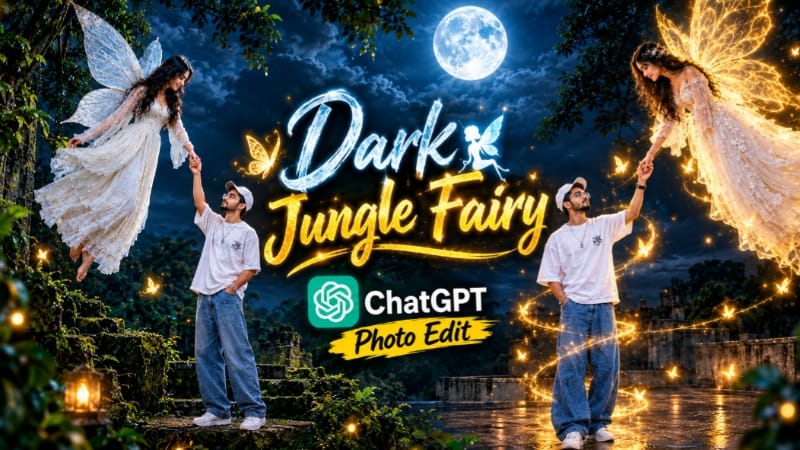
3. Dark Jungle Fairy AI Photo | Cinematic Moonlight Fantasy | ChatGPT Prompt
Dark Jungle Fairy AI Photo ek cinematic fantasy-photo concept hai jisme reference photo ko dark ancient jungle aur moonlit rooftop environment ke saath combine kiya jata hai. Dense tropical foliage, moss-covered vines, large trees, cloudy night sky aur prominent full moon image ko atmospheric depth dete hain.
Composition mein rooftop platform par main subject aur nearby floating fairy ko fantasy elements ke roop mein integrate kiya jata hai. Natural directional moonlight, realistic shadows aur controlled lighting is concept ke important visual elements hain. citeturn872959search8
Step-by-Step Workflow
1. Ek clear reference photo select karein jisme face clearly visible ho.
2. ChatGPT open karke reference photo upload karein.
3. Dark Jungle Fairy AI Photo prompt copy karke paste karein.
4. Reference photo ke facial features, hairstyle, outfit aur pose ko consistent rakhne ki instructions dein.
5. Subject ko rooftop platform par standing pose mein position karein.
6. Fairy ko white ethereal dress aur naturally integrated wings ke saath place karein.
7. Rooftop ke around ancient jungle, mossy vines aur dense tropical foliage define karein.
8. Background mein cloudy night sky aur prominent full moon add karein.
10. Artificial glow aur excessive fantasy effects ko avoid karein agar realistic photographic appearance chahiye.
11. 4:5 portrait format select karein.
12. Image generate karein.
13. Main subject aur fairy ke faces, hands, clothing aur wings carefully check karein.
14. Rooftop, jungle, moon aur lighting ki consistency inspect karein.
15. Unwanted glow, distorted wings ya background errors ko prompt refine karke correct karein.
16. Final image ko high quality mein export karein.
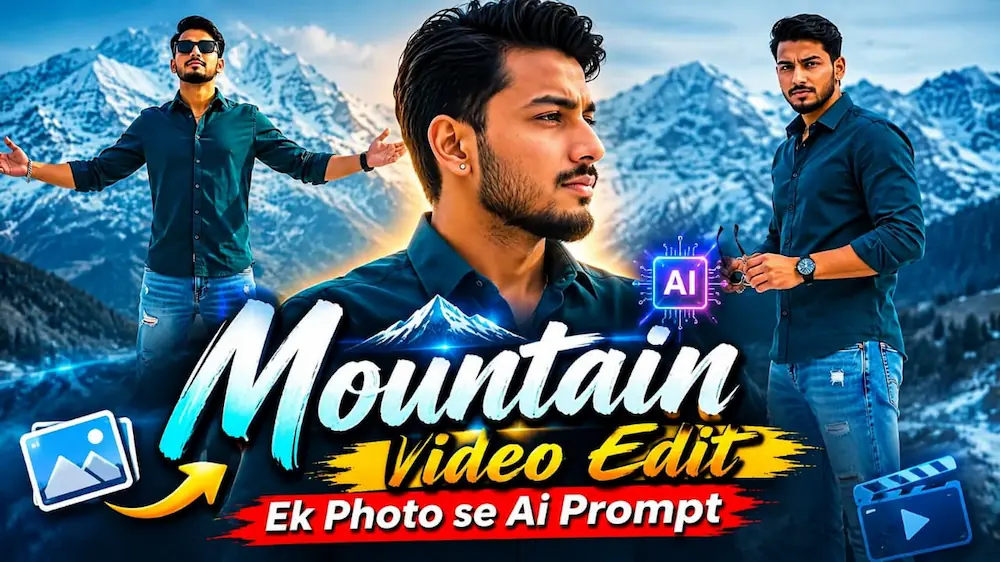
4. Mountain Video Edit | Ek Photo Se Cinematic Flow AI Video
One-photo mountain video editing concept mein ek single reference photo ko use karke scenic mountain environment aur cinematic camera movement create kiya jata hai. Green hills, mountain valleys, pine trees, open sky aur natural lighting video ko travel-film style appearance dete hain.
Single reference photo use karte waqt main challenge ye hai ki character ka face, hairstyle, outfit aur natural proportions connected frames mein consistent rahein. Flow AI mein clearly written prompt aur reference image se desired visual direction specify ki ja sakti hai.
Step-by-Step Workflow
1. Ek clear, high-quality reference photo select karein.
2. Photo mein face aur outfit clearly visible hone chahiye.
3. Flow AI open karke image-to-video workflow select karein.
6. Character identity aur outfit consistency ko priority dein.
7. Mountain background mein green hills, pine trees, valleys aur open sky define karein.
8. Reels aur Shorts ke liye 9:16 vertical format select karein.
9. Widescreen video ke liye 16:9 choose karein.
10. Wide establishing shot se mountain location introduce karein.
11. Medium walking shots se character aur environment ko combine karein.
12. Smooth tracking movement aur natural camera motion maintain karein.
13. Lighting, sky aur mountain background ko scene-to-scene consistent rakhein.
14. Video generate hone ke baad face, hairstyle, outfit aur hands check karein.
15. Walking movement, background distortion aur camera jumps inspect karein.
16. Unwanted changes hone par prompt refine karke video regenerate karein.
17. Final aspect ratio aur resolution check karke export karein.
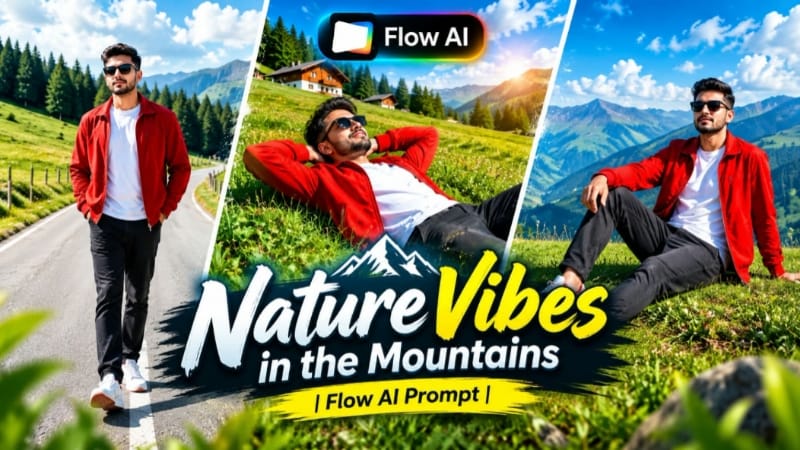
5. Mountain Nature AI Video | Cinematic Music Video | Flow AI Prompt
Mountain Nature AI Video ek cinematic nature-based music-video concept hai jisme green mountain hills, pine forests, valleys, clear blue sky aur natural daylight ko character-based shots ke saath combine kiya jata hai.
Is concept ke liye ChatGPT se character reference sheet prepare ki ja sakti hai, phir Flow AI mein reference image ke saath seven-scene video generate kiya ja sakta hai. Scene sequence mein meadow walking, grassy hillside, mountain ridge, curved road aur elevated final composition included hain. citeturn192469search0
Step-by-Step Workflow
1. Ek clear, high-quality reference photo select karein.
3. Front, side, back aur 3/4 views ko reference ke roop mein ready rakhein.
4. Flow AI open karke image-to-video workflow select karein.
5. Reference image upload karein.
6. Mountain Nature AI Video prompt paste karein.
7. Prompt ke outfit details—red open jacket, white T-shirt, dark charcoal jeans, white sneakers with red accents aur sunglasses—consistent rakhein.
8. Reels/Shorts ke liye 9:16 format ya widescreen ke liye 16:9 select karein.
9. Scene 1: lush green meadow mein walking shot aur pine-forest background check karein.
10. Scene 2: grassy slope par relaxed composition aur sky-facing view verify karein.
11. Scene 3: elevated grass ridge par forward running movement check karein.
12. Scene 4: hill edge par profile composition aur distant landscape inspect karein.
13. Scene 5: curved mountain road par frontal tracking shot verify karein.
14. Scene 6: green hillside par profile walking sequence check karein.
15. Scene 7: raised grassy area aur distant mountains ke saath final hero composition review karein.
16. Face, hairstyle, outfit, hands aur movement ko reference ke according consistent rakhein.
17. Mountain details, trees, sky, lighting aur camera movement inspect karein.
18. Identity drift ya unnatural movement hone par affected scene regenerate karein.
19. Final resolution, framing aur watermark placement check karein.
20. Complete preview ke baad final cinematic video export karein.
Final Result
Ye five concepts AI photo aur video editing ke different creative styles cover karte hain:
- Romantic Beach Couple: five-scene vertical beach video
- Sad Riverbank Love Story: emotional couple storytelling with timed character entry
- Dark Jungle Fairy: moonlight fantasy portrait
- Mountain Video Edit: one-photo-to-video cinematic landscape workflow
- Mountain Nature: seven-scene scenic music video
Best results ke liye clear reference photos use karein aur generation ke baad face identity, hairstyle, clothing, hands, natural movement, lighting, background continuity aur camera framing carefully review karein.
ChatGPT detailed photo compositions aur character reference sheets ke liye, jabki Flow AI photo-to-video generation ke liye use kiya ja sakta hai. Final content export karne se pehle har scene ko preview karein aur sirf problematic scenes ko refine ya regenerate karein.